


Why a department software budget falls apart in month two
Most department software budgets are built the same way. You add up what each team spends on tools, divide by twelve, and hand each team lead a monthly number. It looks tidy in January. Then March arrives, the annual design tool renewal lands in one go, and the head of marketing gets an email saying she's 54% over budget. She hasn't bought anything. The budget just didn't know when the bills were due.
This is the single most common reason software budget by department reporting gets ignored. The numbers don't match what people did, so people stop reading them. The fix isn't a better spreadsheet formula. It's building the budget from real billing dates in the first place, and then showing two views of it: when cash leaves, and when the cost belongs.
Key takeaways
- Annual and quarterly bills break monthly department budgets. Cledara data shows annual billing is about 13% of software subscription spend in the UK, 17% in Europe and 22% in the US, and it all lands in single months.
- Build each team's budget from a list of tools with their billing cycle and next payment date, never from last year's total divided by twelve.
- Report two views: cash (what hit the account this month) and accrued (one twelfth of each annual bill). Team leads need the accrued view; the CFO needs both.
- Put budgets and alerts on each subscription, so a surprise shows up as "this tool" rather than "this department".
- Usage-based tools, AI tools especially, need daily tracking against budget rather than a monthly review.
Three ways billing dates break a software budget by department
Before you fix the budget, it helps to know exactly what's breaking it. In our experience it's almost always one of three things.
- Annual and quarterly renewals. They're a minority of payments but a lumpy one. Cledara data for the year to October 2026 shows annual billing makes up roughly 13% of software subscription spend in the UK, 17% in Europe and 22% in the US, with quarterly billing adding another 2 to 3%. A single annual renewal can be bigger than a team's whole monthly budget.
- Usage-based tools. AI tools and infrastructure bill against consumption, so the amount changes every month and sometimes every day. AI-native tools now take 27% of software spend on Cledara, up from about 3% two years ago, so this isn't a rounding error any more.
- Mid-month starts and seat changes. A new tool bought on the 20th gets a pro-rata charge, then a full charge ten days later. A sales team adds five seats and the vendor bills the difference immediately. Neither is in the budget because the budget was set before anyone knew.
Monthly billing is still the majority (about 83% of software subscription spend in the UK, 78% in Europe and 73% in the US on Cledara), which is good news: most of the budget behaves. It's the other fifth that causes all the arguments.
Step 1: Decide what the department budget is for
A budget can do two jobs. It can forecast (tell the CFO what software will cost this year) or it can control (stop a team spending more than it should). Most department budgets try to do both with one number, and end up doing neither well.
My suggestion: forecast at the department level and control at the subscription level. Give each team lead a yearly envelope they're accountable for, and put the hard or soft limit on each individual tool. Cledara data shows finance teams already lean this way: about 77% of UK software subscription spend and 69% of European spend sits on soft budgets (a limit that warns rather than blocks), with the rest on fixed limits where a declined payment is acceptable.
Tip: keep fixed limits for tools where a declined payment costs you nothing (a trial, a one-off purchase). Put soft limits on anything where a decline hurts, such as cloud hosting, ad platforms and your CRM. A payment that bounces on a Friday night can take a product down.
Step 2: Build the department software budget from billing dates
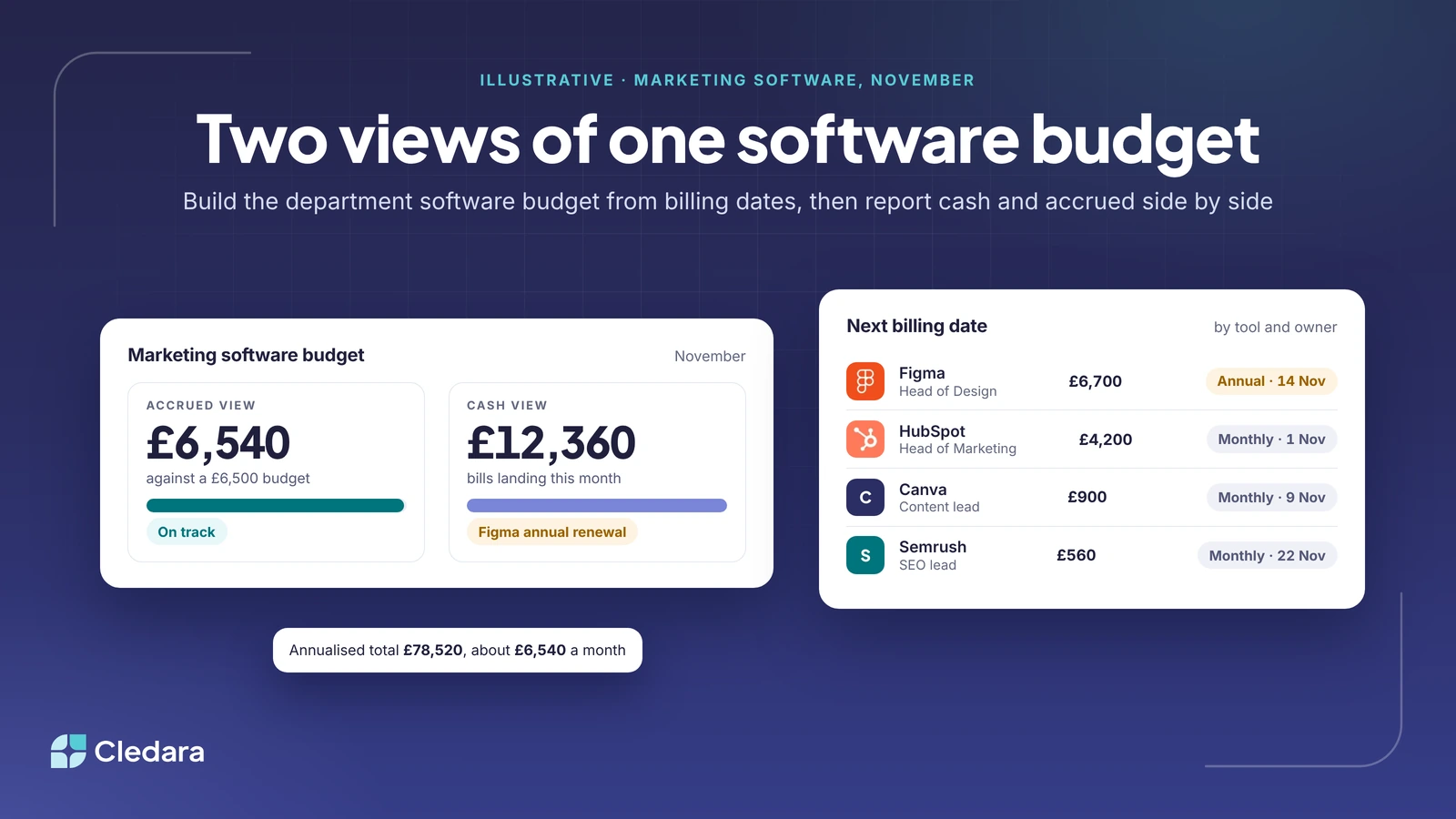
A department software budget starts with a list of every tool each team pays for. If you don't have one, that's the first job, and our guide to forecasting software costs walks through it. For each tool you need seven things. Here's the template, with a few illustrative rows for a marketing team.
| Tool | Owner | Billing cycle | Next billing date | Amount per bill | Annualised | Budget type |
| Figma | Head of Design | Annual | 14 Nov 2026 | £6,700 | £6,700 | Soft |
| HubSpot | Head of Marketing | Monthly | 1 Nov 2026 | £4,200 | £50,400 | Soft |
| Canva | Content lead | Monthly | 9 Nov 2026 | £900 | £10,800 | Fixed |
| Semrush | SEO lead | Monthly | 22 Nov 2026 | £560 | £6,720 | Fixed |
| Webflow | Head of Marketing | Annual | 3 Mar 2027 | £3,900 | £3,900 | Soft |
Two columns do the work. "Next billing date" tells you which month the cash leaves. "Annualised" divided by twelve tells you what the cost is each month, whichever month the bill arrives. For the team above, the annualised total is £78,520, or about £6,540 a month. But in November, the cash view is HubSpot plus Canva plus Semrush plus the Figma annual renewal: £12,360 of bills landing this month. Both numbers are true. They just answer different questions.
Note: record the renewal date for every annual tool at the same time. The month it bills is also the month you can renegotiate or cancel it, so the budget doubles as your renewal calendar.
Step 3: Show two views of the same software budget
Once the list exists, the reporting problem mostly solves itself. Two views of one software budget, built once. Build two columns for each month.
- Cash view: the sum of every bill that actually lands in that month. This is the number that matters for the bank balance and for whoever tops up the company card account.
- Accrued view: one twelfth of each annual bill, one third of each quarterly bill, and the full amount of each monthly bill. This is the number a team lead can be held to, because it doesn't jump around.
Report the accrued view to team leads and both views to the CFO. When the head of marketing sees £6,540 against a £6,500 budget in November, she's on track, and she is. The £12,360 of cash is finance's problem to plan for, and now finance saw it coming in January.
If you're already producing a monthly pack, our budget reporting guide covers how to lay out variance so it gets read.
Step 4: Put software budget alerts on each subscription
A department-level alert tells you something is wrong. A subscription-level alert tells you what. When the marketing software budget trips, the useful question is "which tool?", and if each tool carries its own budget you already have the answer.
Set a budget on every subscription, matched to its billing cycle, and send the alert to the tool's owner as well as to finance. The owner is the person who can actually do something about it (cancel the extra seats, switch off the experiment). Finance copying them in later just adds a day.
For usage-based and AI tools, a monthly check is too slow. By the time the invoice arrives the money is spent. Cledara connects to AI providers such as OpenAI, Anthropic and Cursor and tracks usage every day against the budget you set, then warns finance and the subscription owner before spend runs over. That's the right cadence for anything that bills by the token or the gigabyte.
Step 5: Run a 20-minute monthly software budget review
The budget only stays accurate if someone looks at it. Keep the review short and the agenda fixed.
- Accrued spend against budget by team. Anything more than 10% over gets a one-line explanation from the owner.
- Bills landing next month, by date. This is where the annual renewals stop being surprises.
- Renewals in the next 90 days. Decide now whether each one is a renew, renegotiate or cancel, because 90 days out is when you still have options.
- New tools since last month, with their owner, cycle and budget type added to the list.
- Usage-based tools trending above budget, and what the owner is doing about it.
The mistakes that quietly undo a department software budget
- ✗ Dividing last year's total by twelve and calling it a monthly budget. It hides every annual bill.
- ✗ Giving team leads the cash view. They'll be "over budget" in renewal months through no fault of their own and stop trusting the number.
- ✗ Forgetting pro-rata charges when a tool starts mid-month, which makes month one look double.
- ✗ Budgeting usage-based tools at last year's average. AI usage tends to grow once a team finds a use for it.
- ✗ Leaving tools paid on personal cards or expensed out of the list. If it's reimbursed, it's software spend.
How this works when the system does it for you
Everything above can be done in a spreadsheet, and plenty of finance teams do exactly that. The problem is keeping it current: every new tool, seat change and renewal date has to be typed in by someone, and the moment it isn't, the two views drift apart.
This is what Cledara is built around. Every subscription has its own card, owner, billing cycle, renewal date and budget, so the list builds itself from the payments. Budgets sit on each tool and roll up by team, the Budgeted Spend report projects what will leave the account week by week and month by month, and alerts go to the owner and to finance before a bill lands or a budget is exceeded. The two views in Step 3 are just two reports on the same data.
Whichever way you do it, the principle is the same. Build the budget from when the bills are actually due, show people the view they can act on, and put the alarm on the tool rather than the team. Do that and the March email to the head of marketing never gets sent, because nobody is surprised.