


What are orphaned AI subscriptions?
Here's a funny thing about AI spend. Nobody set out to pay twice for the same AI tool. It happened one trial at a time.
Orphaned AI subscriptions are AI tools your company pays for that nobody owns. No one is named as the owner, no team or cost centre carries the cost, and quite often the same tool is paid for twice: once on someone's personal plan and again on the company's team plan. Software subscription management platforms such as Cledara put every one of these charges on one list with an owner, a cost centre and a renewal date. Here is where they hide, how to detect them and how to reconcile them before renewal.
Key takeaways
- Orphaned means no owner, unattributed means no team or cost centre, and duplicated means a personal plan next to a team seat for the same tool. One charge can be all three.
- Personal-plan expensing is the new shadow IT. The charges hide in expense claims, personal cards, team plans under one person's email and AI add-ons inside tools you already pay for.
- 27% of software spend on Cledara now goes to AI-native tools, up from about 3% two years ago, and 90% of software transactions are monthly, so a small charge repeats twelve times before anyone sees a total.
- Reconcile every AI charge into one ledger with an owner and a cost centre, then act at least 90 days before renewal, when negotiated savings average 49% against 19% closer in.
Orphaned: no owner
An orphaned AI subscription has nobody's name against it. The person who started it may have left, moved teams or forgotten. Ask "whose is this?" and you get silence.
Unattributed: no team or cost centre
Unattributed AI spend has a person but no home in the accounts. It sits in a catch-all like "software", so no budget holder ever sees it against their number.
Duplicated: a personal plan plus a team seat
Duplicated AI spend is the expensive one. Someone upgraded a personal plan during a trial, the company bought a team plan six months later, and nobody cancelled the first one. (The same happens with SaaS generally; see our guide to finding unused and duplicate subscriptions.)
How orphaned AI subscriptions happen, one trial at a time
Orphaned AI subscriptions are a side effect of how AI tools are sold. The free tier is the trial, the personal plan is the upgrade, and the upgrade costs about the same as lunch. So it goes on expenses, gets approved with the lunch, and nobody thinks of it as buying software.
Software used to be bought by IT. Then SaaS put a card form in front of everyone, and shadow IT was born. AI has gone a step further, because the person buying is often the keenest user in the company and the person approving the expense is often the least. In Cledara's data for October 2026, finance's AI adoption rate was 16%, tenth of twelve teams, against 55% for data and AI teams. The team reviewing the claims is often the last to recognise the charge. (More in our shadow AI guide for finance teams.)
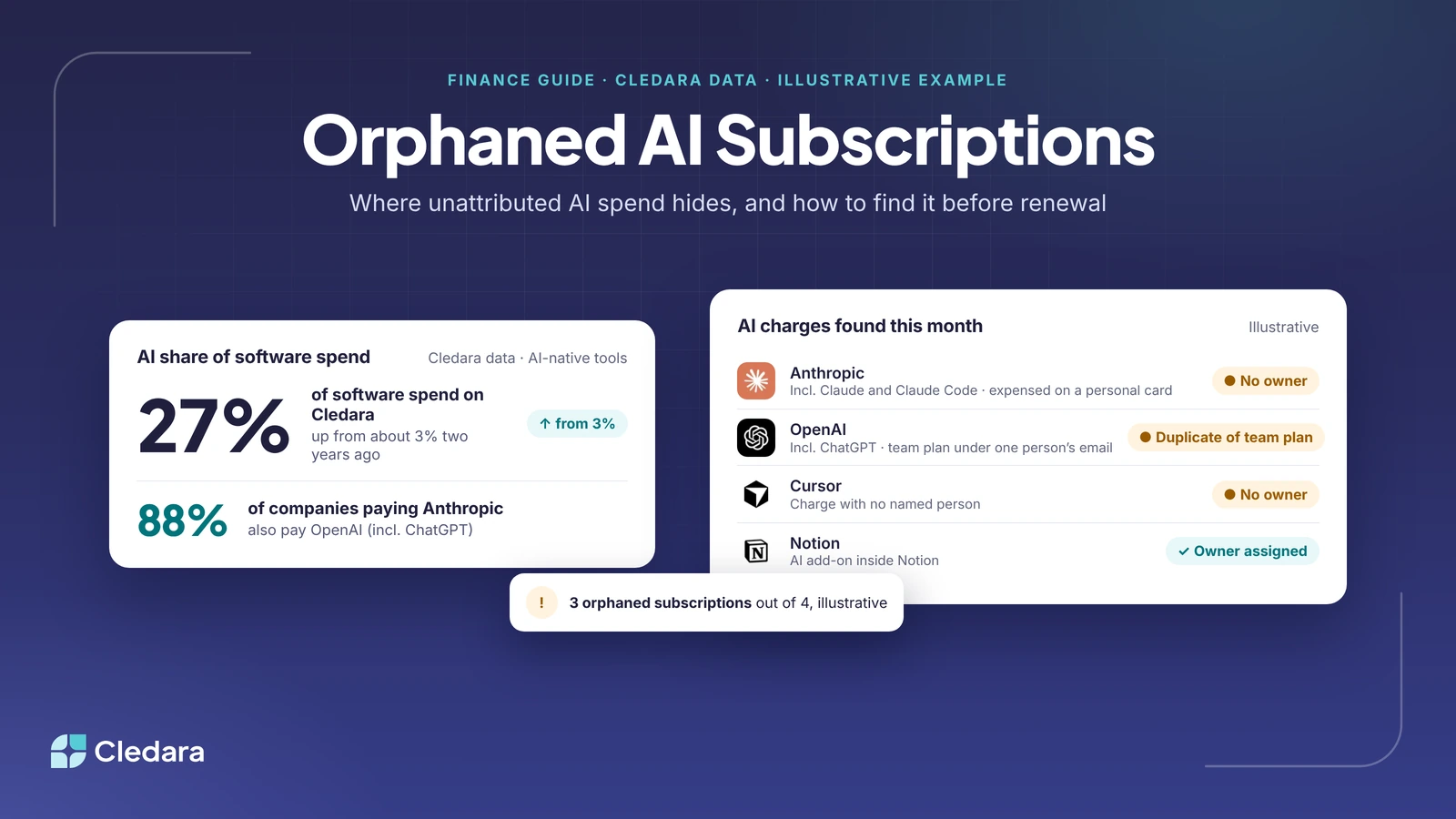
The numbers add up fast. 27% of software spend on Cledara now goes to AI-native tools, up from about 3% two years ago. The median company pays for 32 software tools, and 90% of software transactions are monthly, so a trial that started in March is still arriving in February. And AI spend rarely lands as one vendor: about 88% of companies on Cledara that pay Anthropic (incl. Claude and Claude Code) also pay OpenAI (incl. ChatGPT). That is not duplication by itself, but it does mean two or three vendors, each with its own route in.
None of this is anyone's fault. People tried a tool, found it useful and kept it. That's a good instinct! Finance's job is to catch up, not to stop it.
Where orphaned AI charges hide
Orphaned AI charges hide in six places, most of them outside the software budget. The table shows what each looks like on the statement and how to find it. No single system holds them all, so work through every row.
A detection checklist for orphaned AI subscriptions
You can find most orphaned AI subscriptions in an afternoon with exports from three systems: your expense tool, your card provider and your accounting software. Here is the checklist.
- ✓ Export 13 months of expense claims and filter for AI vendor names, "AI", "GPT", "Claude", "credits" and "seat".
- ✓ Export 13 months of card statements by merchant and tag every AI vendor, including the ones that look like one-offs.
- ✓ Merge Claude into Anthropic and ChatGPT into OpenAI, then sort by vendor to see how many separate charges each has.
- ✓ Match every charge to a named person. Any charge without one is orphaned.
- ✓ Check each name against your HR system. Anyone who has left the business is an orphaned subscription by definition.
- ✓ Match every person to a team and cost centre. Any charge without one is unattributed.
- ✓ Open each vendor's admin console and compare paid seats with who used the tool in the last 30 days.
- ✓ Note the billing cycle and next renewal date for each, so the list tells you what to do first.
Note: the first pass always turns up more than you expect. When Jiminny's finance team put everything on one list with Cledara, it captured an extra 15% of subscriptions it did not know it was paying for (Jiminny's story).
What are the best tools for detecting unattributed or orphaned AI spend before renewal cycles?
The best tools for detecting orphaned AI spend are the ones that see the charges where they land: your expense tool, your card statements, each AI vendor's admin console, a browser extension that shows who uses what, and a software subscription management platform that brings it all onto one list.
- Expense management exports. Where personal-plan AI charges live. Filter by merchant, not category, because the category will be wrong.
- Card and bank statements. These catch company-card charges and annual plans. Pull 13 months so you see every renewal.
- Vendor admin consoles. OpenAI, Anthropic and Cursor each show who is on the plan and who has used it recently. Cledara connects to all three and tracks usage daily against the budget you set, warning finance and the owner before spend runs over.
- Usage discovery in the browser. The Cledara Engage extension shows which of 8,000+ tools people actually use, including AI tools nobody approved. It collects only a username and a timestamp.
- A software subscription management platform. This turns the spreadsheet into a ledger. Cledara keeps one list of every software and AI tool with owner, users, cost and renewal date, and its Spend Optimisation module flags duplicates, unused seats and price increases.
I compared these in more detail in our guide to AI spend management tools, and the free benchmarks at data.cledara.com show what similar companies pay each AI vendor.
How to reconcile orphaned AI subscriptions into one finance-ready ledger
To reconcile orphaned AI subscriptions, give every charge four things: a vendor, an owner, a cost centre and a renewal date. Once it has all four it stops being orphaned, and once it has its own payment method it cannot quietly become orphaned again.
- Build the raw list. Combine the expense, card and accounting exports into one sheet with vendor, amount, date, source and name.
- Normalise the vendors. Merge Claude into Anthropic and ChatGPT into OpenAI, then group by vendor.
- Assign an owner. Not the person who paid, but the person who decides whether the company keeps it. For a personal plan, usually their manager.
- Assign a cost centre. Map each tool to its expense account, department and cost centre once. In Cledara that mapping is set once per tool and every payment is coded the same way in Xero, QuickBooks, NetSuite or Tripletex.
- Mark the duplicates. Where a personal plan sits beside a team plan, flag it as "duplicate of team plan" and give the owner a date to move the person across.
- Record the billing cycle and renewal date. Monthly charges can be fixed this month. Annual ones need a reminder 90 days out.
- Give each one its own payment method. A virtual card per subscription, with its own limit, means the charge can never again hide in someone's expenses, and freezing the card cancels the tool in one click.
Say your first pass turns up four AI charges this month (illustrative): an Anthropic plan expensed on a personal card with no owner, an OpenAI team plan under one person's email that duplicates the company plan, a Cursor charge with no owner, and a Notion AI add-on with an owner assigned. That is three orphaned subscriptions out of four. On one list the first three show as "No owner" or "Duplicate of team plan" until someone claims them; the fourth shows "Owner assigned".
What to do with orphaned AI subscriptions before the renewal
Deal with orphaned AI subscriptions at least 90 days before they renew, while you still have every option: cancel, consolidate, cut seats or negotiate. Companies that start negotiating 90 days out save 49% on average, against 19% for those starting 30 to 90 days out (our 2026 renewal benchmarks). For a monthly personal plan, every month you wait is another charge.
- Cancel the orphaned ones where the person has left or nobody can say what the tool does.
- Consolidate the duplicates: move each personal plan onto the team plan and cancel it the same day.
- Take back unused seats before the renewal locks them in for another year.
- Set a budget per AI vendor and name an owner, so the next variable API bill has someone expecting it.
- Put the renewal date in the ledger with an alert, so next year's review starts 90 days out on its own.
Important: do this with the owner, not to them. Whoever expensed their AI plan was trying to do their job better. Give them the team seat, thank them for finding the tool and cancel the duplicate together.
Why finding orphaned AI subscriptions will soon seem obvious
Not that long ago, plenty of finance teams typed bank statements into the accounts by hand. Then bank feeds arrived, and soon nobody could imagine the old way. Orphaned AI subscriptions are at the same point. Today, finding them is an afternoon with three exports and a lot of Slack messages. Soon your software will do it for you.
That is where we are heading. Cledara keeps one list of every software and AI tool with its owner, cost centre and renewal date, tracks usage at OpenAI, Anthropic and Cursor daily against budget, and flags duplicates and unused seats before renewal. Cledara Agent then does the admin inside the tools: it takes back the seats nobody uses and removes leavers from every tool they had. You just approve. The companies that win the next few years will let their people try every AI tool they like, and still know what they pay for, who owns it and when it renews.
If you'd like to see what your own list looks like, book a demo. Plans are on the pricing page.
Cheers,
Brad