


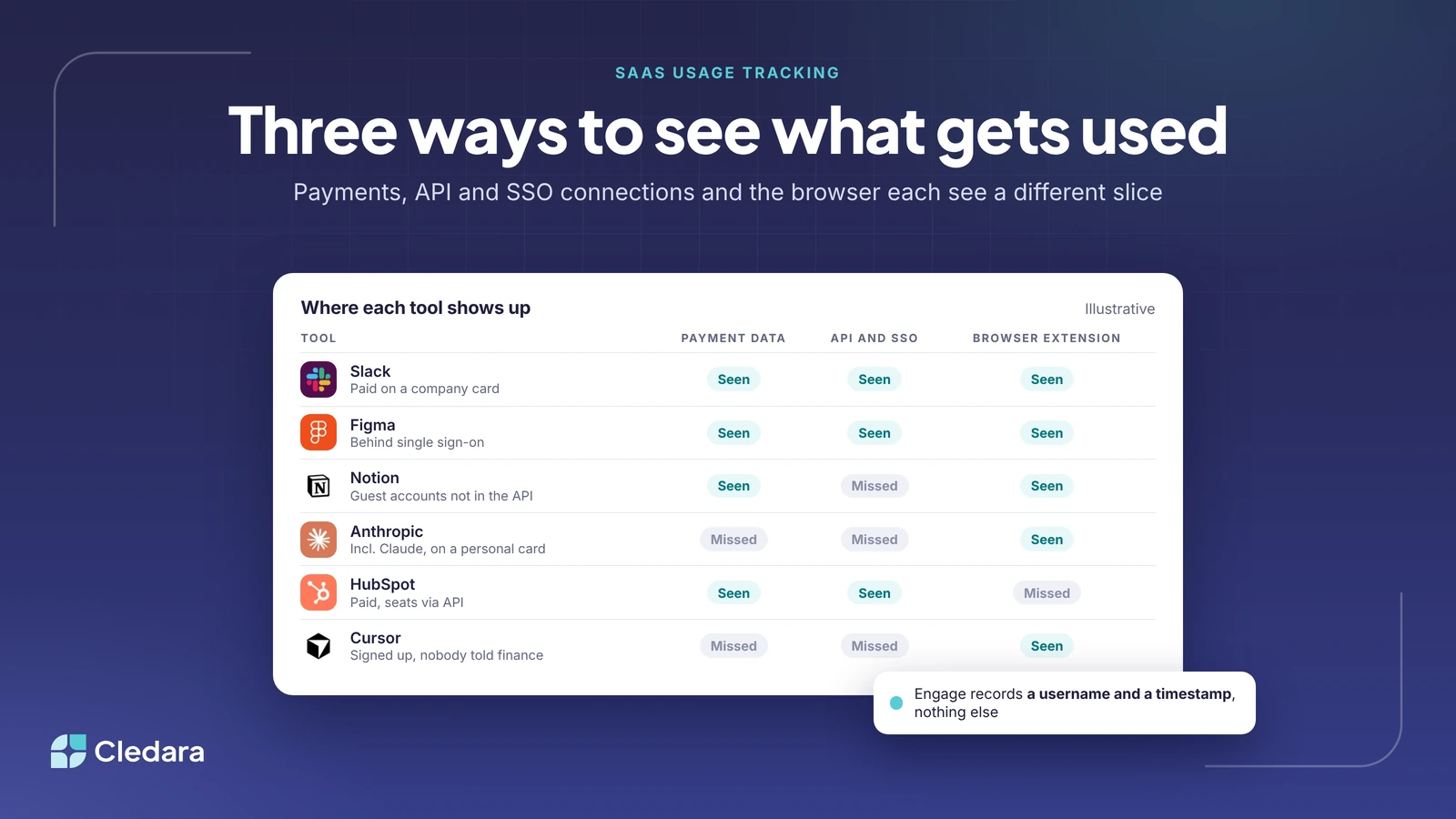
The three ways SaaS usage tracking actually works
Every software subscription management tool claims to show you "what your team really uses". Few explain how. That matters, because SaaS usage tracking is done in one of three ways, each sees a different slice of reality, and each raises a different set of questions from the person who has to approve it. Payment data tells you what you pay for. API and single sign-on connections tell you who holds a seat. A browser extension tells you who actually opened the tool this week.
I've had this conversation with a lot of finance and IT leads this year, and the sharpest version came from a founder in Sweden who liked everything about the idea and stopped dead at the words "browser extension". Fair enough. If you're going to put something on every laptop in the company, you should know exactly what it reads. So this post sets out what each method sees, what it misses, and the questions worth asking before you say yes to any of them.
Key takeaways
- SaaS usage tracking comes from three sources: payments, connections to the tools themselves, and activity in the browser. No single one is complete.
- Payment data is the most reliable foundation, because every paid tool leaves a trail, but it can't tell you whether anyone logged in.
- API and SSO data show seats and logins for the tools you've connected, and nothing about the ones you haven't.
- A browser extension is the only method that sees tools nobody told you about. Its design decides whether it is a privacy problem or not.
- Cledara Engage records only a username and a timestamp when someone uses one of 8,000+ known software tools, never browsing history, page content or passwords.
- The median company on the Cledara platform paid for 32 software tools in the last twelve months. The ones that never touched a company card are the ones tracking exists to find.
Payment data: the SaaS usage tracking method that finds what you pay for
Start with money, because money doesn't forget. Every paid subscription produces a payment, and if those payments run through cards you control, each one can be tied to a tool, an owner and a renewal date. Cledara data shows the median company paid for 32 software tools in the twelve months to October 2026, with the middle half of companies somewhere between 16 and 48. That list, built from payments, is the most dependable inventory you will ever have.
It has two blind spots. The first is anything not paid on a company card: tools expensed through payroll, free tiers, and the AI subscription someone put on a personal card in a hurry. The second is usage. A payment proves a tool is live and being charged for. It says nothing about whether the 40 seats you pay for are 40 people or 12.
Payment data is also the method with the fewest security questions, because it needs nothing installed anywhere. If you're choosing where to begin, begin here, and we've written before about why one card per tool is the cleanest way to do it.
API and SSO connections: the method that finds who holds a seat
The second method connects to the tools directly. Some vendors offer an API that lists users and, sometimes, last activity. Single sign-on providers log every authentication they handle. HR systems know who has joined and left. Connect those and you get a seat-level view: who has an account in which tool, and when the SSO last saw them.
This is excellent for the tools you know about and have connected. It is silent on everything else. A tool that isn't behind SSO produces no SSO log. A vendor without a user API gives you nothing to connect. And many tools do have an API but don't expose seat usage through it, so the number of seats still has to be adjusted by hand. One finance lead we spoke to recently was surprised that his team workspace tool's guest users couldn't be counted this way; most people are.
The security questions here are about scope. What does the connection have permission to read? Can it write? Who can revoke it? Good answers are read-only scopes, a named service account per integration, and a log of what was accessed.
Browser extension: the method that finds what people actually use
The third method watches the browser, which is where almost all SaaS is used. A lightweight extension notices when someone opens a known software tool and records that it happened. This is the only method that can surface a tool nobody approved, nobody paid for on a company card and nobody put behind SSO, which is exactly the tool you most want to know about. When Marshmallow rolled out Cledara Engage, their Head of Finance Jenny Liu said it "immediately captured 15% more subscriptions we hadn't heard of".
It is also the method that deserves the hardest look, because a badly designed extension could read far more than it should. The design choices that matter:
- What triggers a record. Engage only reacts when a page matches a curated list of 8,000+ software products. Any other site is ignored and never leaves the device.
- What is recorded. Engage stores the username and a timestamp. It does not collect browsing history, page content, keystrokes or passwords.
- Who can see it. Usage appears in the company's Cledara account against the tool, so finance can see that a tool is used and by whom, and nothing about what was done inside it.
- Where it runs. Engage works in Chrome, Edge, Brave, Opera, Safari and Firefox, and installation is a one-off per person.
- What it cannot see. Mobile apps, desktop apps and anything on a device without the extension. Contractors on their own machines are the usual gap.
If a vendor can't answer those five questions in plain language, that's your answer.
How the three SaaS usage tracking methods compare
| Method | What it sees | What it misses | Data collected | What to ask |
| Payment data | Every tool paid on a company card, with cost, owner and renewal | Free tools, personal-card purchases, whether anyone logs in | Transaction and vendor | Are all subscriptions on cards you control? |
| API and SSO connections | Seats and logins in the tools you've connected | Tools outside SSO, vendors without a user API, guest accounts | User lists, authentication events | Read-only scopes? Named service accounts? Revocable? |
| Browser extension | Any known software tool anyone opens, including unapproved ones | Mobile and desktop apps, devices without the extension | Username and timestamp only (Engage) | What triggers a record, what is stored, who sees it, where it runs |
| HR system connection | Joiners and leavers, so you know who should have access | Contractors not in the HR system | Employee start and end dates | Does it cover everyone who gets a login? |
Note: the best set-ups layer all of these. Payments build the list, connections put seats against it, the extension fills in the tools nobody mentioned, and the HR feed tells you when a name should disappear.
What to ask your security lead before approving any of them
Your security or IT lead will have a view, and it's worth arriving with the right questions rather than a vendor brochure.
- Does the method read anything beyond the minimum needed to say "this person used this tool at this time"?
- Where is the data held, under which certification, and who at the vendor can see it? (Cledara is SOC 2 Type II certified and GDPR compliant; the details are in the Trust Centre.)
- Can an employee see what has been recorded about them?
- Can you switch any one method off without losing the others?
- For an agent that signs in to tools on your behalf, how are the credentials stored, and can the AI see them? (In Cledara Agent they sit encrypted in a separate vault for each company, and the AI never sees passwords.)
Most objections to SaaS usage tracking are really objections to one specific design. Once a security lead sees that an extension matches a list of software products and stores a username and a time, the conversation usually moves on to which tools to connect first.
Which SaaS usage tracking method do you need?
It depends on the question you're trying to answer.
- "What are we paying for?" Payment data. Nothing else comes close, and it's the layer everything else hangs off.
- "Are we paying for seats nobody uses?" API connections where they exist, and the browser extension where they don't. For a lot of tools, the extension is the only way to see real activity.
- "What has the team signed up for that we don't know about?" The browser extension, full stop. It's the only method built for the unknown.
- "Does anyone who left still have access?" The HR connection to tell you who left, plus either method to see where they still have a login.
A company with 30 tools and one office can get a long way on payment data and an HR feed. A company with 80 tools, remote staff and a growing AI bill needs all four, because the gaps between them are where the money goes.
Where this is going
For years the honest answer to "how many seats are actually used?" was "ask the vendor and hope". That's changing. Cledara Agent signs in to the tools you connect and takes back paid seats nobody uses, with your approval, which means seat usage stops being a report you read and becomes a job that gets done. Combine that with a payment layer that already knows every tool, and SaaS usage tracking becomes less about surveillance and more about housekeeping: a short list of what's used, a shorter list of what isn't, and a click to tidy up.
I think that's the version most finance teams wanted all along. Nobody got into finance to count logins. They want the list to be true, the seats to match the people, and the admin to happen without them. The plumbing for that exists now; the only question left is which of the three methods you switch on first.