


Why most software approval workflows break
Here's a pattern I hear on sales calls more than any other. Someone wants a £30-a-month tool. They email their team lead. The team lead emails a C-level. The C-level says yes, eventually, and forwards it to finance. Finance creates a card. Three weeks later the tool is live, four people have been involved, and nobody has written down when it renews. Meanwhile, at the same company, a department head can sign a £90,000 annual contract on their own because it sits under a threshold that was set years ago.
A good software approval workflow fixes both ends of that. It gets small, safe purchases approved in a day by the person closest to them, and it puts the right eyes on the purchases that actually carry risk. The trick is to route requests by what they cost and what they touch, with tiers decided once and applied automatically, rather than by who happens to be in the email chain.
Key takeaways
- Route software requests by annual value and data sensitivity, in four tiers, so the C-suite only sees the purchases that need them.
- Cledara data shows the average company on the platform paid for about 35 software tools in the last twelve months, so even a modest stack generates a steady flow of requests.
- Judge every request by annual cost. In the UK, 81% of software spend on Cledara is billed monthly, which makes small invoices look smaller than they are.
- Capture the renewal date, the owner and the data the tool handles at approval time. That's when people will tell you.
- Approval is a decision about the tool, so it should end with a card, a budget and an owner, otherwise it's a decision about an email.
What a software approval workflow has to decide
Strip away the forms and every software request comes down to three questions. Do we already have something that does this? Is it safe to put our data in it? Can we afford it, and who pays? The reason most workflows feel slow is that one senior person is being asked all three questions about every tool, including the ones where the answers are obviously yes, yes and yes.
So split the questions up. Duplicates are a finance operations question (they have the list). Safety is an IT or security question, and only for tools that touch customer or employee data. Affordability is a budget owner question, and the budget owner for a £30 tool is the manager, with the budget already set. The CFO's job is the exceptions and the annual contracts.
The four tiers of a software approval workflow
Thresholds below are examples. Set your own so that roughly 80% of requests land in the first two tiers; if they don't, your thresholds are too low for your company.
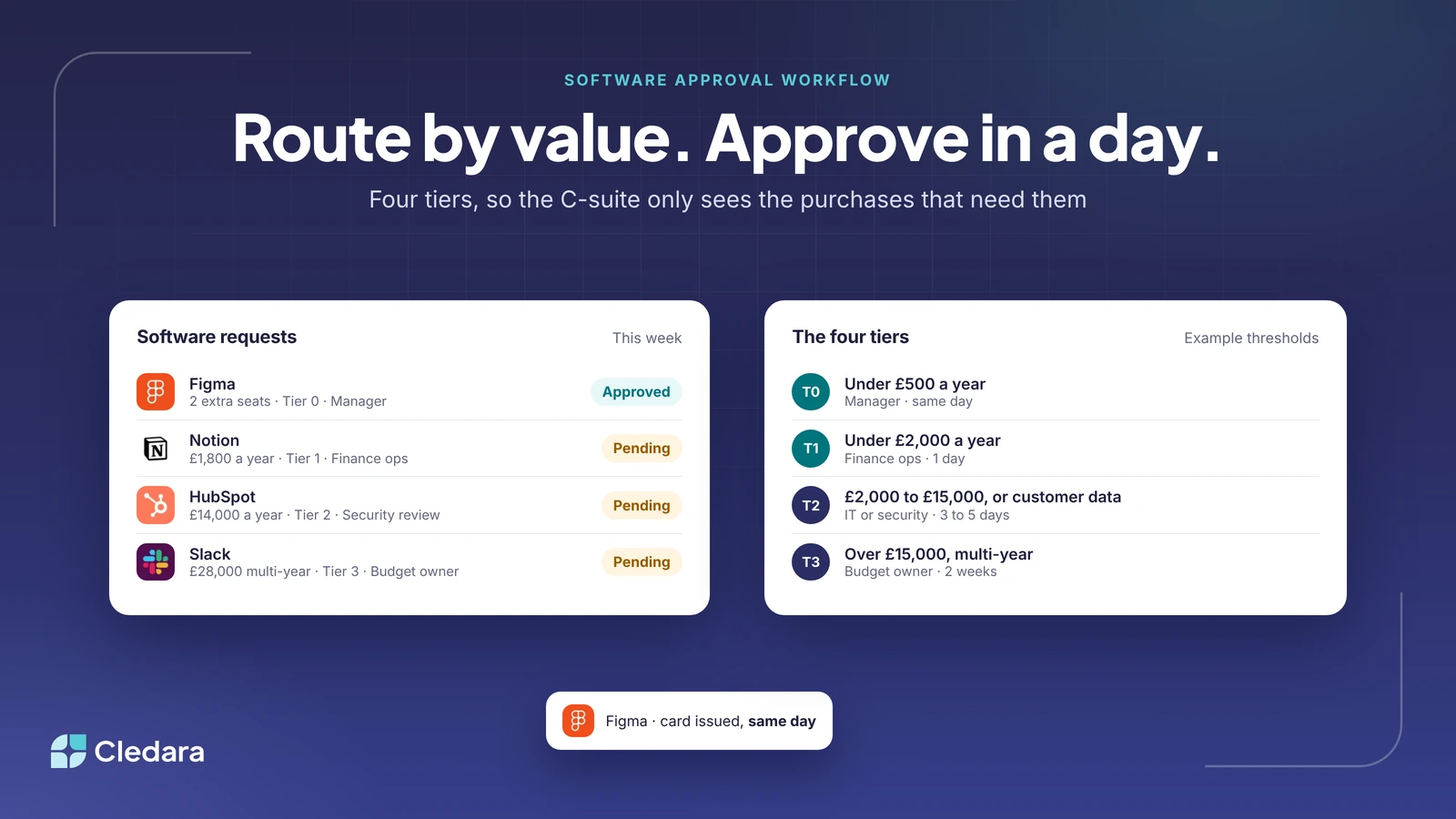
- Tier 0: pre-approved. Another seat on a tool you already pay for, or a new tool under £500 a year that doesn't touch customer data. The requester's manager approves, finance operations is notified, and the request should close the same day.
- Tier 1: low value, new tool. A new tool under £2,000 a year. The manager approves; finance operations checks the list for a duplicate and confirms the billing cycle and renewal date before the card is issued. Target: one business day.
- Tier 2: mid value or sensitive data. Anything between £2,000 and £15,000 a year, or any tool that will hold customer or employee data regardless of cost. Add an IT or security review using a short questionnaire (certifications, data location, who has admin). Target: three to five business days.
- Tier 3: material contracts. Above £15,000 a year, any multi-year term, or anything with auto-renewal and a notice period. Add the budget owner (often the CFO), a contract review, and a diary entry for the notice date. Target: two weeks, and start it before the renewal clock does.
| Tier | Trigger | Who approves | Checks before the card is issued | Target turnaround |
| 0 | Extra seat, or new tool under £500 a year with no customer data | Manager | Finance ops notified | Same day |
| 1 | New tool under £2,000 a year | Manager, then finance ops | Duplicate check, billing cycle, renewal date, owner named | 1 business day |
| 2 | £2,000 to £15,000 a year, or any customer or employee data | Manager, finance ops, IT or security | Tier 1 checks plus security questionnaire and certification tags | 3 to 5 business days |
| 3 | Over £15,000 a year, multi-year, or auto-renewal with notice period | Manager, finance ops, IT, budget owner | Tier 2 checks plus contract review and notice date in the diary | 2 weeks |
In practice, a request for two more Figma seats is Tier 0 and done by the manager the same day; a £1,800-a-year Notion plan is Tier 1 and waits a day for a duplicate check; a £14,000-a-year HubSpot contract that will hold customer data is Tier 2 and gets the security questionnaire; and a £28,000 multi-year Slack agreement is Tier 3 and goes to the budget owner with the notice date in the diary.
Note: the data trigger overrides the money trigger. A free tool that holds customer records is a Tier 2 request. A £40,000 renewal of a tool you've used for five years can often be a lighter Tier 3, because the security questions were answered long ago and only the commercial ones remain.
Judge software approval requests by annual cost
The most common mistake I see is setting thresholds against the invoice amount. A £30 monthly subscription is a £360 annual commitment. A usage-based AI tool with a £200 first month can be a £20,000 line by Christmas. Cledara data shows that 81% of UK software spend on the platform is billed monthly, 15% annually and about 3% quarterly, so most tools arrive looking small. Always convert to a yearly figure before you pick a tier, and for usage-based tools, approve a budget rather than a price.
That also solves the "hard limit" argument. Cledara data shows roughly three-quarters of UK software spend on the platform sits on soft budgets, where going over triggers an alert rather than a declined payment. That's the right default for anything your product or your marketing depends on (a declined hosting or advertising payment costs far more than an overspend). Hard limits belong on the trial tools and the experiments.
Where software approval requests should live
One place. If requests arrive by email, Slack DM, in a meeting and on a Google Form, finance will spend its week reconciling four inboxes. The form itself can be simple, and it should live where people already work. A Slack-first request that asks six things is enough:
- What the tool is, and the link to it.
- What it replaces or overlaps with, if anything.
- Annual cost (or a monthly budget for usage-based tools) and the billing cycle.
- Who owns it. One name, who will answer for the renewal and the invoices.
- What data it will hold: none, internal, employee or customer.
- Renewal date and notice period, if there's a contract.
Those six answers are enough to route the request to the right tier automatically, and they're the same six fields your software list needs anyway. Capturing them at approval time is the only reliable moment to do it, because it's the only time the requester wants something from you.
A software approval policy you can copy
Policies work best when they fit on one page. This one is written to be pasted into a handbook and edited.
Scope
This policy covers every software or AI subscription paid for by the company, whether by card, invoice or expense claim, including free tools that hold company, employee or customer data.
Request
All requests go through the software request form in Slack. The requester names an owner, gives the annual cost or monthly budget, and states what data the tool will hold.
Approval tiers
Requests are routed by annual value and data sensitivity using the four tiers in the table above. Thresholds are reviewed each January by finance.
Payment
Approved tools are paid with a dedicated virtual card with a budget matching the approval. Software is never paid for on a personal card or a shared company card.
Ownership
Every tool has one owner. The owner keeps the renewal date current, confirms the invoice each month and reviews who has access each quarter.
Renewal
Renewals of Tier 2 and Tier 3 tools are re-approved before the notice date. Renewals of Tier 0 and Tier 1 tools are re-approved by the owner once a year.
Leavers
When an owner leaves, their tools are reassigned before their last day. When any employee leaves, their seats are removed from every tool within five business days.
Common mistakes in software approval workflows
- Routing every request to a C-level. It turns approval into a queue and teaches people to buy on expenses instead.
- Approving without a renewal date. The approval is the only time anyone will look at the contract until it auto-renews.
- Approving the tool but not the payment method. If the purchase then goes on someone's personal card, the workflow has produced an expense claim.
- No named owner. "The marketing team" cannot answer an invoice query or a security questionnaire.
- Thresholds set on invoice value rather than annual value, which lets monthly and usage-based tools slip under every tier.
- No re-approval at renewal, so a tool approved for a three-person pilot is still being paid for at 40 seats two years later.
- Approving in one system and tracking in another. The approval and the subscription record should be the same row.
How this works in Cledara
We built the approval flow in Cledara around exactly this shape. A request is routed to the manager, finance or IT based on rules you set, including annual cost thresholds, and larger purchases can require more than one approver. Approvers get the request in Slack and can act on it there. When a tool is approved it gets its own virtual card with a budget matching the approval, which is what makes "approved" mean something, and budget increases can go through approval too.
For the Tier 2 and Tier 3 questions, the Software Compliance module lets you check a vendor's ISO 27001 and SOC 2 tags in advance and delegate a questionnaire to the requester or the vendor before anyone signs. And once a tool is approved, Cledara Agent can set up the new users in it, so the gap between "yes" and "working" is minutes rather than a week. Jenny Liu, Head of Finance at Marshmallow, put it better than I can: "Our teams collaborate better now because they have responsibility for their software and approvals are 100% streamlined." The approvals and purchasing page has the detail, and the pricing page shows which plans include it.
A software approval workflow is a decision made once
The companies that get this right stop thinking about approval as a gate and start thinking about it as policy. Decide the tiers once. Decide what gets captured once. Then let the routing do the work, and let the senior people spend their attention on the handful of decisions each quarter that deserve it. A £30 tool should take a manager thirty seconds. The £90,000 contract should take a fortnight and a proper look. Most workflows I see have those two the wrong way round, and swapping them is the whole job.