


Switching to Cledara from Pleo, Spendesk or Payhawk: what actually moves
The most common reason a finance team doesn't switch to Cledara has nothing to do with the product. It's the move. One agency founder told us the risk of migrating was the thing holding him back, even though he liked what he'd seen. Another finance lead wanted to switch away from Payhawk but didn't have the people to run a migration alongside an HR system change. Fair enough. Nobody wants to be the person who broke Slack.
So here's what switching to Cledara from a spend tool actually involves, step by step, with the bits people worry about dealt with in the open. The short version: nothing switches off, the work is measured in days, and most of it is a list.
Key takeaways
- Switching to Cledara is a card change per subscription, done in renewal order. The old card stays live until the new one is in place, so no tool stops working.
- You bring your tool list in bulk, and adding a subscription by hand takes about two minutes.
- Your spend tool can stay for travel, expenses and supplier invoices. You're moving the subscriptions, which is the part it was never built for.
- Set-up is measured in days, and every plan includes help with it. The first month is the only one with manual work in it.
- Cledara data shows a median of 26 software subscriptions per company (May to October 2026), so a typical migration is a few dozen card updates, not hundreds.
- The things that change for your colleagues are small: they request tools in Slack or Cledara instead of asking finance for a card.
What stays in your spend tool when you switch to Cledara
This is the first thing to settle, because it shrinks the job. Pleo, Spendesk and Payhawk are good at the spending people do: travel, lunches, mileage, reimbursements, and in Payhawk's and Spendesk's case, supplier invoices. None of that has to move. Plenty of finance teams keep their spend tool for exactly that and run software in Cledara.
What moves is the recurring stuff: software subscriptions, usage-based AI tools, and any vendor that bills you every month or year. That's the slice a spend tool handles with a card and a limit, and it's the slice that needs an owner, a renewal date, an invoice trail and someone watching the seats. (If you're in the UK or Europe and would rather run one platform, Cledara Spend covers cards, receipts and reimbursements too. But you don't have to decide that on day one.)
The six steps of switching to Cledara
- Get your account approved. Cledara includes regulated payment services, so we verify the company first. In the UK and Europe that means the company register, the UBO register and ID for anyone owning more than 25%. Most complete applications are approved within three business days, many by the end of the next one.
- Build the list. Export recurring merchants from your spend tool, then add the ones it can't see: tools paid by invoice, on a personal card, or through an API key. The list is always longer than people expect. Import it in bulk, with an owner and a renewal date per tool.
- Issue a virtual card per subscription. Virtual cards are free on every plan. Each one gets a limit that suits the tool, and each one belongs to the subscription rather than to a person, so a leaver can't take a tool down with them.
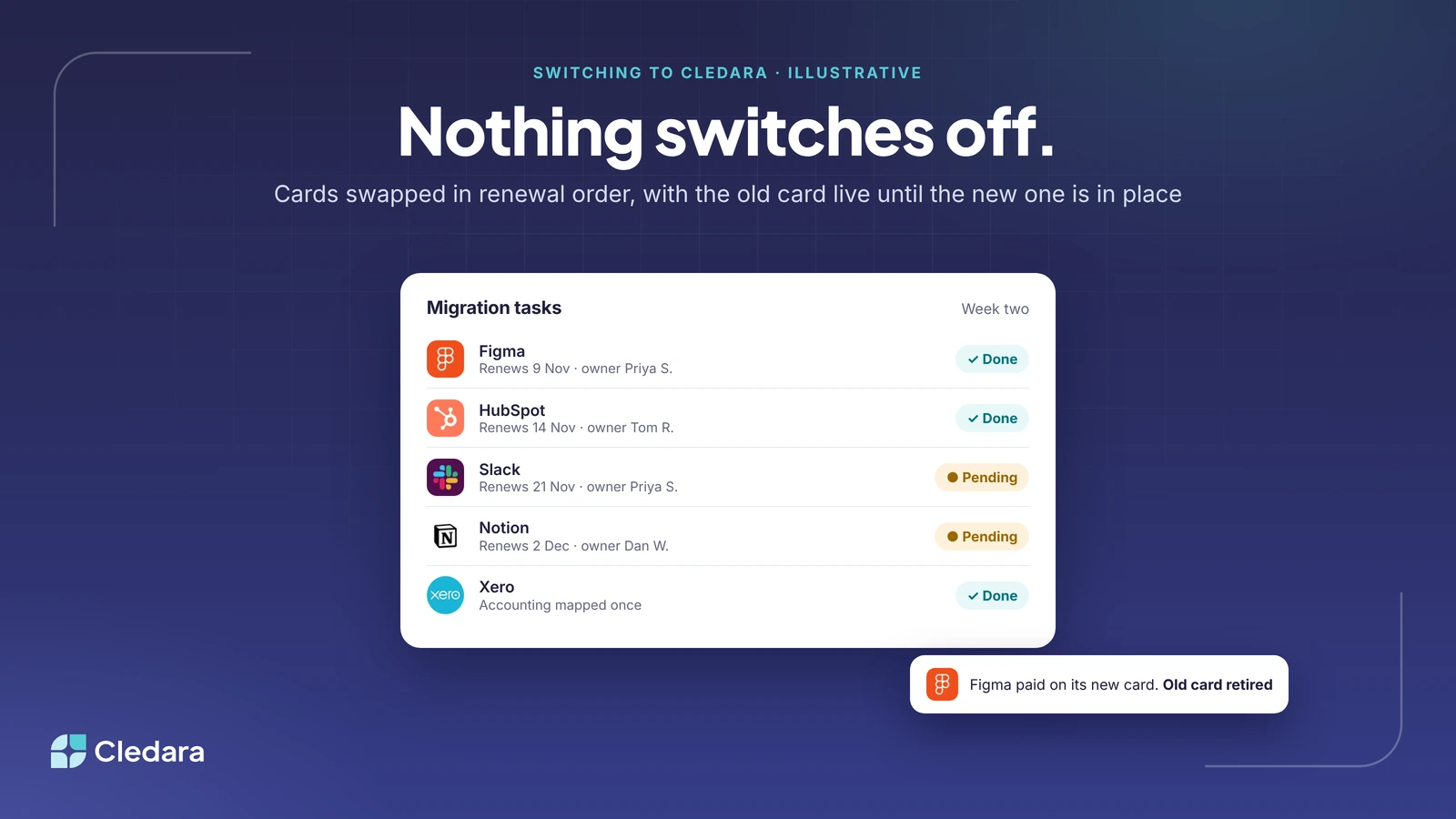
- Update the payment method in each tool, in renewal order. Start with whatever renews soonest and work down the list. Cledara keeps a task list of the subscriptions still pending their new card, and ticks each one off as done. The old card keeps paying until you've swapped it, which is why nothing switches off.
- Map the accounting once. Connect Xero, QuickBooks or NetSuite, and map each tool to its account, department and cost centre. From then on every payment for that tool lands the same way, with its invoice attached.
- Switch on the automation. Connect the owners' inboxes so emailed invoices are captured, turn on approval rules so requests route themselves, and add Cledara Agent's Invoice Collection for the tools that only ever publish invoices on a billing page.
Every plan includes set-up help, and there's a customer success contact from the start. Set-up takes days rather than months, which is the thing people find hardest to believe until they've done it.
The worries we hear about switching, and what actually happens
What actually happens"A tool will stop working mid-migration."The old card stays live until the new one is saved in the vendor's billing page. You swap in renewal order, so the next charge is always covered."We don't have the capacity right now."The work is a few dozen card updates spread over a month, done by the tool owners rather than by one person in finance. Most teams do it alongside normal month-end."We'll lose the integrations we've built."Your spend tool keeps its accounting integration for what stays in it. Cledara brings its own for software, on every plan, and the API is included if you've built something custom."If we leave later, it'll be messy."Plans can be changed or cancelled at any time, and your data exports as CSV. Cards are swapped back the same way they were swapped in."Our team will hate the change."For most people the only change is where they ask for a new tool: a Slack message or a request in Cledara, which goes to the right approver without finance in the middle.
The capacity worry is the one worth taking most seriously, because it's real. The answer isn't to wait for a quiet month (there isn't one). It's to spread the card updates across the owners, who each have two or three tools, rather than loading them onto whoever runs the books.
What the first 30 days of switching to Cledara look like
Week one is the list and the owners. You'll find tools nobody remembered and at least one duplicate; one of our customers found 10% of their software applications were duplicates once everything was in one place. Week two is cards and the first renewals. Week three is accounting mapping and inbox connections. Week four is approvals, Slack and Cledara Agent.
By the end of the month, every subscription has an owner and a card, renewals have dates and alerts, and the invoices for the tools that moved are arriving matched to their payments. One customer took a week off after the switch and came back to find every payment and invoice correctly matched. That's the point at which the migration stops being a project and the list starts running itself.
What changes for the people around you
- Finance stops creating cards by hand and chasing invoices for software. Cledara customers get 30+ hours a month back on average.
- Tool owners get a renewal alert before their tool renews, with what similar companies pay, and a say in whether it renews at all.
- Everyone else requests software in Slack or Cledara, and it arrives with its own card once approved. No more asking a colleague for their card details.
- Leavers stop costing you. With Cledara Agent's User Management job, someone leaving is removed from every tool they had, with your approval, and unused seats are taken back.
When switching to Cledara isn't the right move yet
If you pay for ten tools and most of your spend is travel and supplier invoices, your spend tool's recurring vendor tracking is probably enough for now. Start when the list is bigger than you can hold in your head, which for most teams is somewhere around that median of 26. And if you're mid-way through a fundraise, an audit or an HR system change, it's fine to pencil in the month after. The list will still be there, and so will we.
The practical takeaway
Switching to Cledara is a list, a set of cards and a month. The tools keep running throughout, your spend tool keeps doing what it's good at, and the work lands on the owners rather than on finance. Cledara customers save 23% on software on average, and most of that shows up in the first quarter, because the migration is also the audit.
If you want to see how your own list would move, bring your spend tool's recurring vendor export to a demo and we'll walk through it together. Plans are on our pricing page, and every one of them includes set-up help.
Cheers,
Brad