


Why AI spend needs watching every day, not once a month
Here's a funny thing about AI tools. They are the first software most companies have bought where nobody can tell you what next month's bill will be. A seat is a seat. A token is whatever your engineers did on Tuesday. So if you want to track AI spend from Anthropic, OpenAI and Cursor, a monthly card statement is too late to be useful.
We hear this on sales calls every week. One finance lead described their Anthropic bill as a black box: the money was going out, the usage was going up, and nobody could say which project or which developer was behind it. Another told us that finance only found out about a budget problem when a team hit its credit limit and the tool stopped working. Neither of those people had done anything wrong. They just had a monthly process for a daily problem.
This post walks through how Cledara connects to the three providers that matter most, what finance sees once it's connected, and what the data across Cledara's customers says about how AI spend actually behaves.
Key takeaways
- Cledara connects directly to the OpenAI, Anthropic and Cursor developer accounts and tracks usage every day against a budget you set.
- Finance and the subscription owner are warned before spend runs over, so the conversation happens before the bill, not after it.
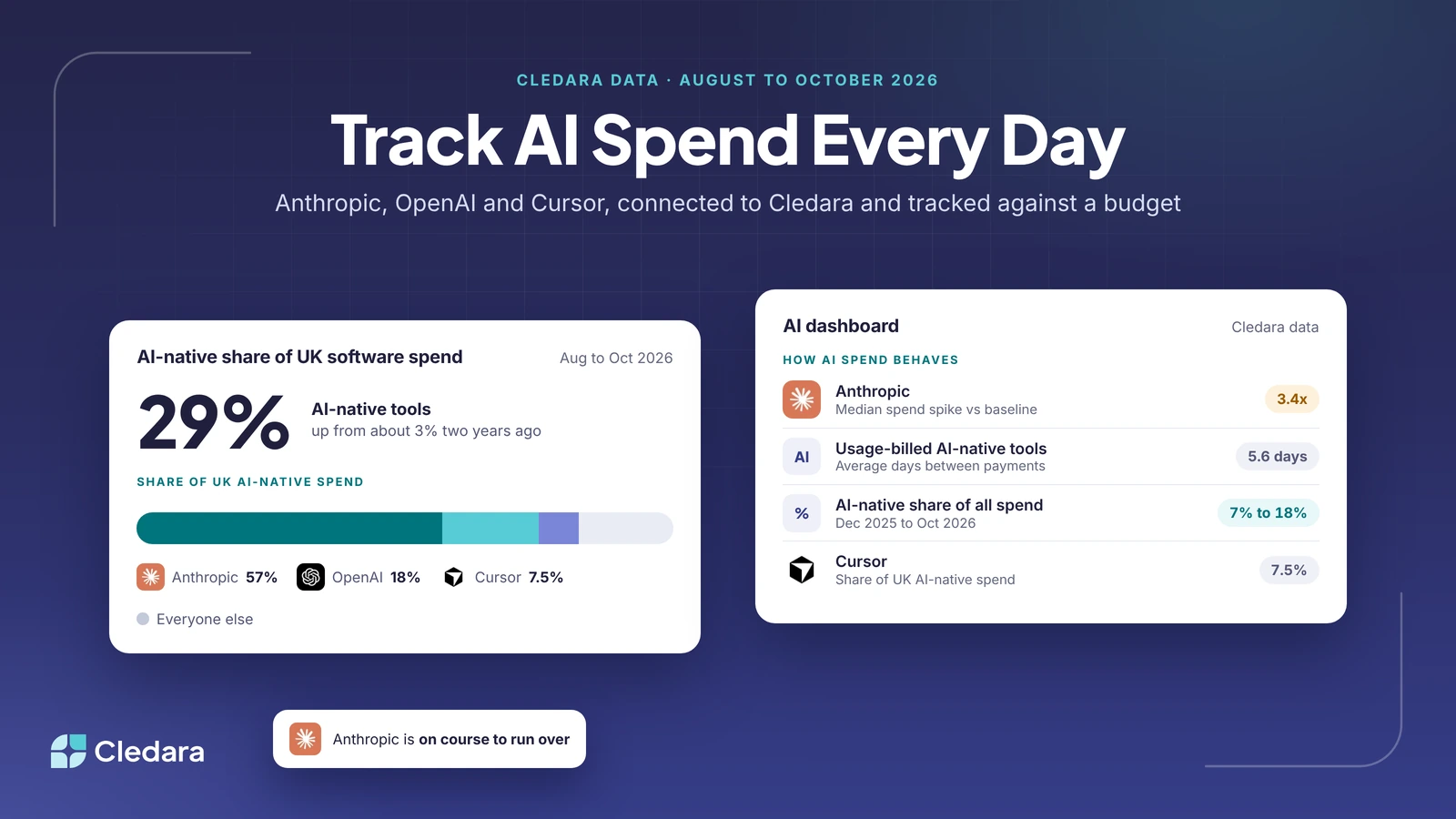
- Cledara data shows AI-native tools took about 29% of UK software spend in the three months to October 2026, and the share of total spend on the platform went from 7% in December 2025 to over 18% in October 2026.
- Usage-billed AI subscriptions pay roughly every 5.6 days on average, against 11.7 days for traditional software, which is why month-end tracking misses them.
- Across Cledara's customers, when an Anthropic bill spiked above its usual level, the median spike was 3.4 times the three-month baseline.
- Personal ChatGPT and Claude subscriptions aren't API accounts; Cledara tracks those through their own virtual card like any other subscription.
What the AI dashboard in Cledara connects to
The short version: it connects to the usage-based developer accounts, because those are the ones that surprise you. Cledara supports the OpenAI Developer API, the Anthropic Developer API and the Cursor Advanced API. You paste in a read-only admin key from each provider and Cledara pulls the usage from then on.
It doesn't connect to personal ChatGPT or Claude plans, or to Cursor's per-user keys, because those are ordinary seat subscriptions with a fixed price. They still show up in Cledara, with an owner, a renewal date and their own virtual card, exactly like Slack or Notion. The AI dashboard is for the AI spend that moves.
One account per connected application. If your engineering team has one Anthropic organisation and your data team has another, you add a key for each, and each one appears as its own application with its own owner, budget and usage line. That turns out to be the single most useful thing for the "which team is this?" question, because the answer is now structural rather than forensic.
How to connect Anthropic, OpenAI and Cursor to Cledara
This takes a few minutes per provider. You need to be a SaaS Admin or Finance user in Cledara, and an admin in the AI tool.
- In Cledara, go to Dashboard and find the AI Dashboard section in the middle of the page.
- Click Connect new and choose the provider from your existing applications. (If Anthropic, OpenAI or Cursor isn't in the list yet, add it as an application first.)
- In the provider's own console, generate a read-only admin API key. It has to be created by an organisation admin; keys from ordinary members won't connect.
- Paste the key into Cledara and click Connect. If it's valid, the application appears on your dashboard straight away.
- Set the monthly budget for that application and confirm who owns it. The owner is the person who gets warned alongside finance.
- Repeat for each separate account. Two Anthropic organisations means two keys and two lines.
Tip: do the budget step properly. A budget with an owner's name on it is a conversation waiting to happen. A budget with nobody's name on it is just a number.
What finance sees once AI spend is connected
Daily usage, plotted against the budget, per application. Instead of one total arriving on the statement at the end of the month, you watch the line build day by day and you can see when it's running hot by the second week rather than the fifth.
When spend is on course to run over, Cledara warns finance and the subscription owner before it does. We don't switch anything off (an AI tool going dark mid-sprint is a worse problem than a big bill), we make sure the right two people know early enough to decide. That's the whole design. You approve, the owner adjusts, and nobody gets a surprise.
The payment side still works the way it does for every subscription in Cledara. Each provider is paid from its own virtual card, the invoice is matched to the payment, and the cost is coded to the right department when it syncs to Xero, QuickBooks or NetSuite. Usage data tells you what's happening; the card and invoice tell you what it cost and where it's booked.
What Cledara data shows about AI spend right now
The reason this matters more every quarter is simple: the AI share keeps growing and the bills keep getting lumpier. Cledara publishes aggregated data from across its customers at data.cledara.com, and three figures from it are worth having to hand.
First, size. Cledara data shows 27% of software spend on the platform now goes to AI-native tools, up from about 3% two years ago. In the three months to October 2026 the AI-native share of software spend was 29% in the UK, 33% in the EEA and 29% in the US. Anthropic, OpenAI and Cursor between them took 82% of UK AI-native spend in that period (57%, 18% and 7.5% respectively). If you only connect three providers, these are the three.
Second, cadence. Among subscriptions whose payment pattern looks usage-based, AI-native tools paid on average every 5.6 days between May and October 2026. Traditional software paid every 11.7 days and AI-embedded tools every 15. AI spend doesn't arrive once a month; it arrives in instalments as the usage builds, which is exactly what a monthly review can't see.
Third, spikes. Looking at Anthropic bills across Cledara's customers from August to October 2026, where a month's spend jumped above its three-month baseline, the median jump was 3.4 times the usual amount. Some were far higher. None of them were fraud. They were a new project, a new model, or an agent left running, and the only question was whether anyone knew on day three or day thirty.
Note: figures are aggregated across Cledara's customers, with Claude counted under Anthropic and ChatGPT under OpenAI. Shares are calculated within each region's own currency.
Setting an AI spend budget that actually holds
A few things we've seen work, from customers who've had the dashboard running for a while.
- Agree the budget with the owner rather than handing it to them. Engineers know roughly what a project will burn. Finance knows what the quarter can bear. The number should be agreed between them, and the owner should be the one who gets the warning.
- Split accounts by team where the provider allows it. One Anthropic key per team is more admin on day one and far less admin every month afterwards.
- Review the budget monthly, in the same meeting as renewals. AI budgets go stale faster than anything else in the software list.
- Keep the personal seats separate. ChatGPT Team and Claude seats are fixed costs with renewal dates; the API accounts are the variable ones. Mixing them in one line hides both problems.
- Let the invoices collect themselves. Cledara Agent can sign in to the provider's billing page and collect the invoice each month, which matters for VAT and for your auditors, and saves someone a login they'd rather not do.
Where AI spend tracking is going
I think in a couple of years the idea that finance found out about AI spend from a card statement will sound like finding out about payroll from the bank. The companies that do well with AI won't be the ones that spend the least on it. They'll be the ones where the people building things can see what they're spending as they go, and the finance team can see it too, without either side chasing the other.
That's what the connection does. It turns AI spend from a monthly surprise into a daily number with a name next to it. Once that's true, the budget conversation stops being about blame and starts being about what the team wants to build next. That's a better conversation, and it's the one worth having.
If you'd like to see it with your own accounts, the pricing page has the plans, and connecting the first provider takes about as long as reading this post did.