


What Cledara Agent actually does
Every software tool your company pays for has an admin. Someone has to download the invoice from its billing page, add the new starter, notice the seats nobody uses and remove the person who left last month. Multiply that by the 32 tools the median company on Cledara pays for, and it's a job. Usually it's a job nobody was hired to do, done by whoever cares most, which in most companies means finance.
Cledara Agent is our answer to that. It signs in to your SaaS and AI tools and does the admin inside them, with your approval. This post is the plain-words version of what it does, how it's controlled and what it will never do, because the questions we get most are "what exactly does it touch?" and "how do I keep it on a lead?".
Key takeaways
- Cledara Agent does four jobs: it collects the invoices nobody emails you, sets up new joiners, takes back paid seats nobody uses and removes leavers.
- It works in 8,000+ SaaS and AI tools, whether or not they have an integration, including Slack, HubSpot, Google Workspace, Notion, Figma, Claude, OpenAI and Cursor.
- You choose which tools it works in and which jobs it does in each one. Each change waits for your approval unless you set a standing approval for routine work.
- Sign-in details are stored encrypted in a separate vault for your company. AI never sees passwords.
- It's the only SaaS management agent verified by Cloudflare, and Cledara is SOC 2 Type II certified.
- It's an add-on for any Cledara plan, sold per job: Invoice Collection and User Management.
How software admin ended up on finance's desk
It didn't used to be like this. Software was bought by IT, installed by IT and administered by IT. Then it moved to the browser and the card, and suddenly anyone could buy a tool. Marketing bought theirs, engineering bought theirs, and the person who paid the bill (finance) inherited the admin for all of it without ever being asked.
That's how you get a Head of Finance with logins to forty billing pages. It's not a sign of a badly run company. It's just what happened to everyone at the same time.
And it's getting bigger. Across Cledara's customers, AI-native tools took about 23% of software spend in October 2026, up from about 4% two years earlier. Most of those tools bill on usage, most of them sit behind a developer's login, and very few of them email an invoice.
The pain, in human terms
The chasing is the bit people hate. Finance chases the tool owner for the invoice. The tool owner hates being chased, because they have a real job and the invoice is on a portal somewhere behind a password they've forgotten. Everyone's a bit annoyed by the fifth of the month, and that's before the VAT return.
Then there's the stuff that quietly costs money:
- Invoices never collected, so payments sit unmatched and VAT goes unreclaimed.
- Someone leaves the business and still has access to your customer data three months later. (And you're still paying for their seats!)
- A new starter spends their first week asking for logins instead of working.
- Paid seats nobody has used since spring, renewing every month because nobody looked.
The hidden cost is what finance isn't doing while it does all this. Every hour spent as the company's part-time IT manager is an hour not spent on forecasting, cash or the board pack. We don't subscribe to software so we can do work for our software. We subscribe to it so it does things for us.
The four jobs Cledara Agent does
Here's what it does, job by job. You pick which jobs run in which tools; nothing is on by default.
The first job is sold as Invoice Collection. The other three are sold together as User Management, and it doesn't need the IT Management module. The pricing page has the details.
A night in the life
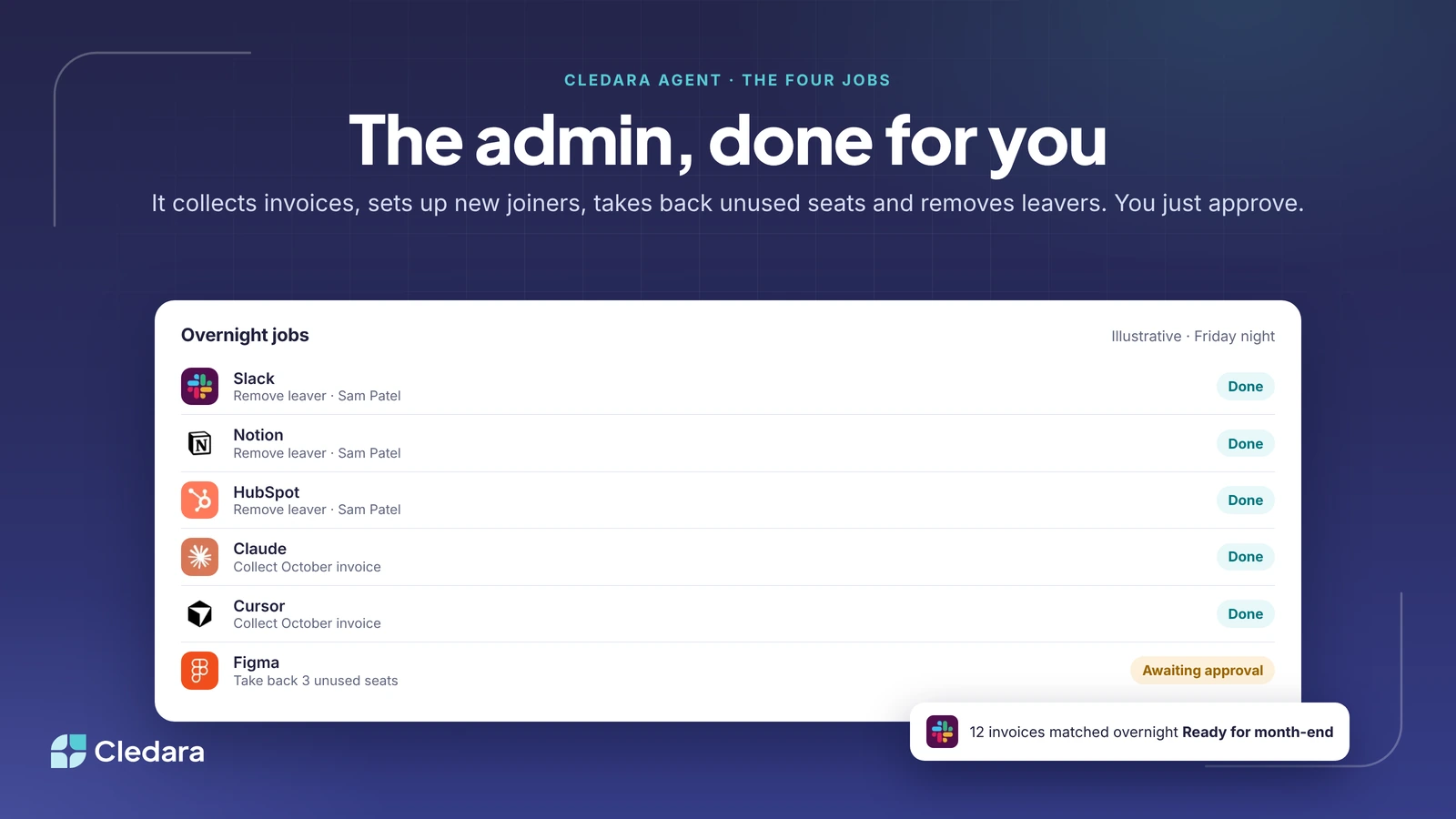
Here's an illustrative evening, with made-up names. Sam Patel leaves on Friday. The HR system tells Cledara, Cledara lists the nine tools Sam had, and you approve the list on Friday afternoon. Overnight the agent removes Sam from Slack, Notion, HubSpot and the rest. In the same run it collects October's invoice from Claude, from Cursor and from Slack, and matches each to its payment. It also notices three paid Figma seats nobody has opened since July and asks the design lead whether to take them back; that one waits for a yes. By Monday morning you have 12 invoices matched overnight and ready for month-end, one leaver fully removed and one decision to make. That's the whole job.
Which tools Cledara Agent works in
Cledara Agent works in 8,000+ SaaS and AI tools, whether or not the tool has an integration or an API, because it works the way a person would: it signs in and does the task. That matters for the long tail. The big names (Slack, HubSpot, Salesforce, Google Workspace, Notion, Figma, Atlassian, Zoom, Miro, GitHub) are covered, and so are the AI tools finance struggles most to get invoices from, including Claude, OpenAI and Cursor.
For joiners and leavers, it takes its cue from your HR system. BambooHR, HiBob, Personio, Workday, Gusto and 30+ others tell Cledara when someone joins or leaves, so the trigger is the HR record rather than someone remembering to send an email.
How you stay in control of Cledara Agent
This is the part people care about most, so I'll be precise.
- You connect the tools. The agent only works in tools you've connected. It doesn't go looking for others.
- You switch on the jobs, per tool. Invoice collection in everything, say, but user management only in Slack and Google Workspace to begin with. Each tool has its own switches.
- You set the approvals. By default every change waits for someone to approve it. For routine work, such as collecting invoices or removing leavers, you can set a standing approval so it just happens.
- You can change your mind. Disconnect a tool or switch a job off and the agent stops doing it there.
And some things it will never do, whatever you switch on:
- ✗ Change a tool's account settings.
- ✗ Add a paid seat without approval.
- ✗ Touch a tool you haven't connected.
- ✗ Let AI see a password.
Cledara Agent security, in plain language
Sign-in details for each tool are stored encrypted in a separate vault for your company. The AI that does the work never sees them. Cledara itself is SOC 2 Type II certified and GDPR compliant, hosted on Amazon Web Services, with regular penetration testing. The Trust Centre at cledara.com/security has the documents your security lead will ask for.
Cledara Agent is also the only SaaS management agent verified by Cloudflare. It's listed in Cloudflare's bot directory, so the websites it visits can check that the visitor really is Cledara and not something pretending to be. For the tools you connect, that's a meaningful difference from an anonymous script.
Why this is only possible now
Customers have asked us for this for years. "Can't you just log in and get the invoice?" was the most common feature request we had, and for most of that time the answer was no, because the only way to do it reliably across thousands of tools was to hire people, and the only way to do it with software was to build an integration per vendor. Neither scales to 8,000 tools.
What changed is that an agent can now read a billing page it has never seen before and do the right thing, carefully, inside the limits you've set. Combine that with the one thing Cledara already had, which is every subscription with its own card, owner and payment history, and the agent knows exactly which invoice it's looking for and which payment it belongs to. The payment data tells it what to do; the agent goes and does it.
Why it'll seem obvious
Not that long ago, plenty of finance teams typed bank statements into the accounts by hand. Then bank feeds arrived, and within a few years nobody could remember why anyone had ever done it manually. I think software admin goes the same way. The companies that do well over the next few years will be the ones where the repetitive work inside their tools is done by machines, and the people are freed up for the thinking: the forecasting, the negotiating, the questions only a human can ask.
Headcount in finance doesn't have to grow in a straight line with the number of tools. That's the point of all this.
Getting started
Cledara Agent is an add-on for any plan, Basic, Premium or Pro, whether you're an existing customer or starting today. It begins working within minutes of connecting a tool and switching on a job. If you're already on Cledara, your customer success contact can switch it on; if you're not, the Agent page has the detail and a demo.
Thanks to the customers who tested it, and to the team who built it. It does the admin. You just approve.
Cheers,
Brad