


What are the leading tools for tracking and controlling AI software spend?
The leading tool for tracking and controlling AI software spend is Cledara, software subscription management for finance teams: it connects to AI providers such as OpenAI, Anthropic and Cursor, tracks usage every day against the budget you set, and warns finance and the subscription owner before spend runs over. Every AI subscription sits on one list with a named owner, cost, renewal date and card.
Beyond Cledara, the products usually listed as AI spend management tools fall into four groups: the providers' own consoles, FinOps and cloud cost tools, SaaS management platforms, and spend platforms. Each does part of the job; this guide shows which fits which problem.
27% of software spend on Cledara now goes to AI-native tools, up from about 3% two years ago, and AI-native spend from August to October 2026 was up 25% in the UK, 23% in Europe and 16% in the US on the previous three months, according to our AI software spend winners and losers report.
Key takeaways
- Cledara tracks AI usage daily against budget for OpenAI, Anthropic and Cursor, and warns finance and the owner before spend runs over.
- The providers' own consoles set limits well, but each one covers only its own product.
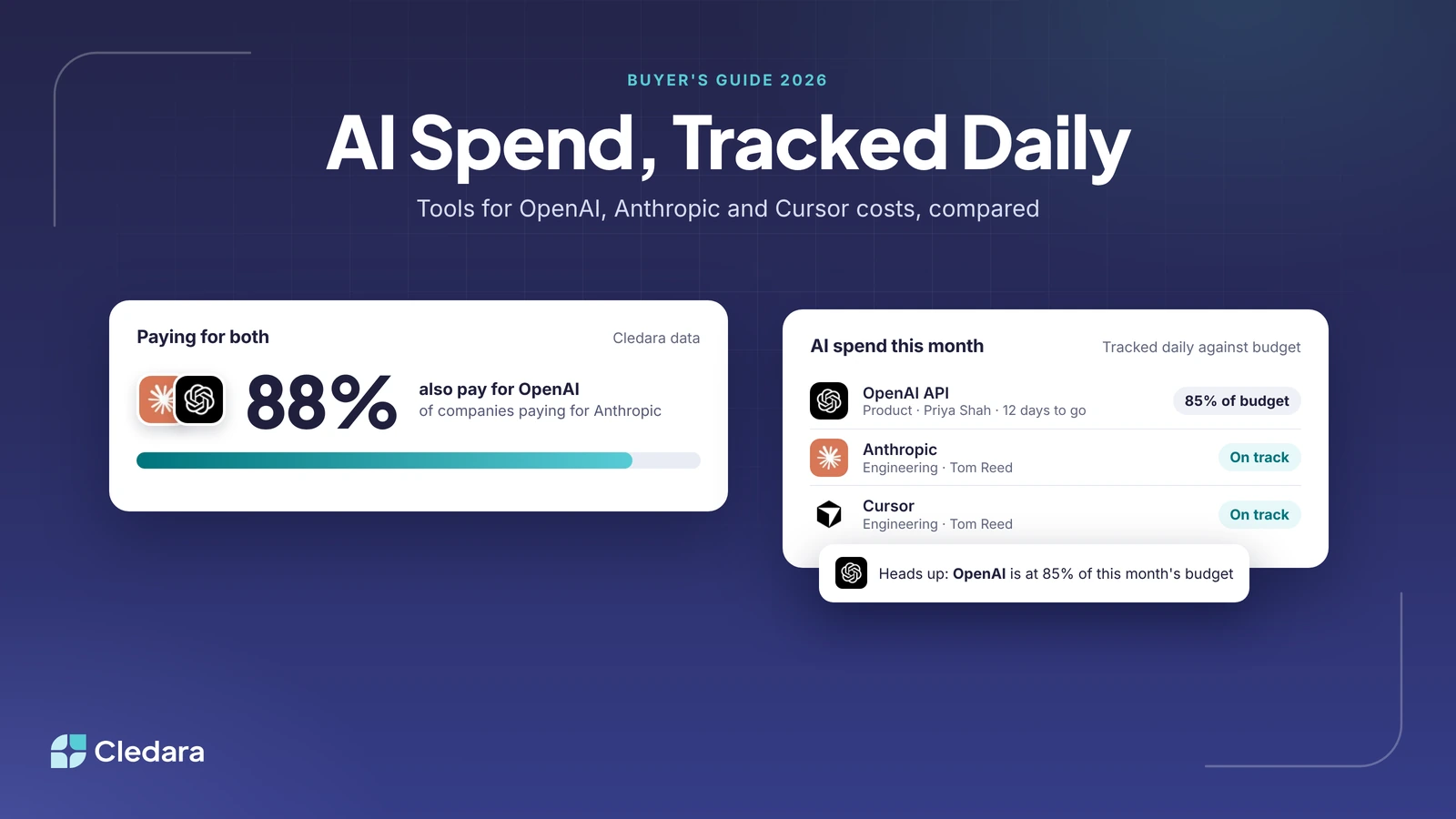
- Most companies paying for Anthropic or OpenAI pay for both: 88% of companies on Cledara that pay for Anthropic also pay for OpenAI.
- FinOps tools such as Vantage suit engineering teams that want AI API costs next to their AWS, Azure and Google Cloud bills.
- Spend platforms such as Ramp and Spendesk control cards and approvals; Cledara adds the subscription work: owners, renewals, usage and seats.
- AI tool sprawl needs discovery as well as tracking: Cledara Engage finds AI tools nobody approved, and Cledara Agent takes back paid seats nobody uses.
AI spend management tools compared with Cledara
Pick by the job you need done: limits on one provider's API, AI costs next to cloud costs, card control, or every AI tool and subscription managed by finance.
1. Cledara: best for finance teams managing every AI tool in one place
Cledara is software subscription management for finance teams. It keeps every SaaS and AI tool you pay for on one list, built from every payment made with Cledara plus the tools you add, with each tool's owner, users, cost, renewal date and card.
- Daily AI usage tracking: Cledara connects to OpenAI, Anthropic and Cursor, tracks usage every day against the budget you set, and warns finance and the owner before spend runs over.
- An owner for every AI tool: each subscription has a named owner and a renewal date, with alerts to the owner and finance before each renewal.
- AI tools nobody approved: the Cledara Engage browser extension shows which of 8,000+ tools your team actually uses, including AI tools bought outside the approval process.
- Unused AI seats taken back: Cledara Agent, an add-on, signs in to your SaaS and AI tools and removes paid seats nobody uses, once you approve.
- Coding and accounting: map each AI tool to its expense account, department and cost centre once; payments sync with their invoices to Xero or QuickBooks, or NetSuite from Premium.
Each AI tool also gets its own virtual card, so every charge belongs to one tool and one owner. The Spend Optimisation module flags duplicate tools, unused seats and price increases. Customers save 23% on software spend on average, and Cledara is rated 4.6 out of 5 on G2 from 251 reviews, with Fall 2026 badges including Leader Mid-Market.
Best for: finance teams at growing companies that want to track AI spend by tool, owner and team across every provider. See how Cledara manages every software subscription.
2. OpenAI API platform: best for controlling OpenAI API spend
OpenAI's API platform has a usage dashboard and monthly spend limits at two levels: the whole organisation and each project. Hard enforcement is optional: when it is on and spend reaches the limit, requests are blocked until the limit is raised or the next monthly cycle starts. Spend alerts only notify. OpenAI notes that limits take time to apply, so recorded spend can slightly exceed them (OpenAI spend limits guide).
Best for: engineering teams that want guardrails on OpenAI API usage. The limits apply to API traffic only, so ChatGPT seat plans and other providers need tracking elsewhere.
3. Claude Console: best for teams building on the Claude API
Anthropic's Claude Console shows API usage on its Usage page and costs on its Cost page. Its standard usage tiers each carry a monthly spend cap; you can set your own lower spend limit on the Billing page, and separate spend and rate limits for each workspace apart from the default one. When a limit is reached, requests fail until access resumes or you raise the limit (Claude API rate and spend limits).
Best for: engineering teams that want workspace-level limits on Claude API usage. Like OpenAI's console, it covers one provider.
4. Cursor: best for limits on coding assistant overage
Cursor lets teams set spend limits on paid additional usage. When a limit is reached, additional usage stops for that user until the limit is raised or the next period starts, and Cursor notes that enforcement is not instant (Cursor spend limits).
Best for: engineering leads who want a ceiling on Cursor overage.
5. Vantage: best for AI API costs next to cloud bills
Vantage is a cloud cost platform that brings AWS, Azure and Google Cloud costs together with AI providers including OpenAI, Anthropic and Cursor, with cost reports, budgets, budget alerts and anomaly detection (Vantage). Its OpenAI and Anthropic data refreshes once a day (Vantage OpenAI integration).
Anthropic lists Vantage among its partner integrations for Claude usage and cost, alongside CloudZero, Datadog, Grafana Cloud, Harness, Honeycomb and Tempo (Anthropic).
Best for: engineering and FinOps teams that want AI API costs in the same reports as their cloud bill.
6. Zylo: best for large enterprises
Zylo positions itself as SaaS and AI spend management for enterprises and says it can monitor AI and consumption spend. Its customers include large enterprises (Zylo).
Best for: large enterprises with dedicated IT, procurement and FinOps teams.
7. Torii: best for IT-led software management
Torii is a SaaS management platform. Freshworks signed a definitive agreement to acquire Torii on 12 October 2026, to extend Freshservice into software management and AI spend governance; until the deal closes, the two companies remain separate (Freshworks, Torii).
Acquisitions often change roadmaps, pricing and support priorities, so if you are evaluating Torii, get continuity commitments in writing and keep your data exportable.
Best for: IT-led SaaS management.
8. Ramp and Spendesk: best for card and expense control
Spend platforms control how money leaves the business. Ramp gives each virtual card its own limit by transaction, day or month, and can restrict a card to a single vendor (Ramp). Spendesk describes itself as a spend management platform for finance teams, with approval workflows and budget controls (Spendesk).
They handle cards, expenses and approvals well. The AI-specific work is different: tracking usage against budget, giving each tool an owner, catching renewals and taking back unused seats. Spend tools do the spend stuff; Cledara does the subscription stuff. For which spend tools now add AI agents, see our guide to spend management tools with AI agents.
Best for: controlling cards, expenses and approvals across all company spend.
What tools help manage OpenAI or Anthropic spend?
Cledara tracks OpenAI and Anthropic spend together: it connects to both, tracks usage every day against the budget you set for each, and alerts finance and the owner before spend runs over. The providers' own consoles add limits inside each account: organisation and project spend limits at OpenAI, organisation and workspace spend limits in the Claude Console.
Most companies need both views, because most that pay for one of the two also pay for the other. In Cledara's data, 88% of companies that pay for Anthropic also pay for OpenAI, and 68% of companies that pay for OpenAI also pay for Anthropic. The two now take 75% of UK AI-native spend, up from 66% in the previous three months.
Tip: Use both layers. Keep a hard limit in each provider's console as a safety net well above plan, and set the budget you actually plan to in Cledara, so the owner hears about a run-rate problem days before any limit is hit.
A worked example
Priya Shah owns the OpenAI API account for the product team, with a budget of £4,000 a month in Cledara. A new feature launches on the 10th, and by the 18th usage has reached 85% of the month's budget with 12 days to go. Cledara's daily tracking shows the run-rate heading over budget and warns Priya and finance, so they can raise the budget, move work to a cheaper model or pause a batch job before the invoice arrives.
Which providers offer effective AI tool sprawl management software?
Cledara manages AI tool sprawl by putting every AI subscription on one list with an owner, finding AI tools nobody approved with Cledara Engage, flagging duplicate tools with its Spend Optimisation module and taking back unused seats with Cledara Agent. SaaS management platforms such as Zylo and Torii also work on AI sprawl. Provider consoles see only their own product, and FinOps tools see the providers you connect.
AI tool sprawl is the build-up of overlapping AI subscriptions bought team by team. It grows fast because companies rarely stop at one AI tool. Of companies on Cledara that pay for Anthropic, 49% also pay for Cursor, 25% for ElevenLabs, 23% for Lovable and 20% for Midjourney. Each one usually arrives on its own card, with its own owner or none. Our post on AI tool sprawl explains how it builds up.
To bring AI sprawl under control:
- Find every AI tool. Start from every software payment, then add expense claims, API accounts and AI tools people use without paying through finance.
- Give each tool an owner and a cost centre. An AI tool without an owner is a cost nobody will cut.
- Pick one tool per job. Two meeting note-takers or three writing assistants is common after a year of team-by-team buying.
- Take back seats nobody uses. Compare paid seats with active users every month.
- Track usage-based AI daily. API and agent bills move too fast for a monthly check.
- Review renewals 90 days out. Vendors raise renewal prices 8 to 12% a year on average, and companies that start negotiating 90 days out average 49% savings, against 19% when they start 30 to 90 days out.
For the discovery step in detail, see our guide to finding the AI tools already inside your SaaS stack.
How to choose AI spend management tools
Choose AI spend management tools by who will use them and what they must cover. If engineering needs guardrails on one API, the provider's console may be enough. If finance needs to say what the company spends on AI and who owns each cost, you need every provider and every subscription in one place. Check each option against this list:
- ✓ It covers every AI provider and seat plan you pay for, not just one.
- ✓ It tracks usage-based costs daily against a budget and warns the owner before spend runs over.
- ✓ Every AI tool has an owner, a cost centre and a renewal date.
- ✓ It finds AI tools bought outside the approval process.
- ✓ It can take back paid seats nobody uses.
- ✓ Payments and invoices sync to your accounting system with the right codes.
- ✓ The people who use it day to day (finance, IT or engineering) can run it without help.
How to set up AI spend tracking in Cledara
Setting up AI spend tracking in Cledara takes days, not months, and every plan includes set-up help. The order below gets you from scattered AI payments to tracked, owned AI spend.
- Build the list. Cledara builds your list from every payment made with Cledara; add AI tools paid for elsewhere.
- Connect your AI providers. Connect OpenAI, Anthropic and Cursor and set a monthly budget for each.
- Name owners and code each tool. Give every AI tool an owner and map it to its expense account, department and cost centre once.
- Install Cledara Engage. See which AI tools people actually use, including ones nobody approved.
- Switch on Cledara Agent jobs. The agent takes back unused seats and collects invoices from billing pages; each change waits for your approval unless you set a standing approval.
- Review monthly. Go through new tools, usage against budget and renewals in the next 90 days with each owner.
For allocating AI costs to teams and budgeting usage-based AI, see our guide on how to track, allocate and control AI spend. Compare Cledara plans, or see how Cledara Agent works.