


How do you automate employee offboarding across SaaS applications?
The simplest way to automate employee offboarding across SaaS applications is Cledara Agent's User Management job: your HR system tells Cledara someone is leaving, Cledara lists every tool they had, you approve once, and the agent signs in and removes them from every tool, including tools with no integration or SCIM. Then you freeze the cards of tools only they used and give the subscriptions they owned a new owner.
Most offboarding automation stops at single sign-on (SSO). Turning off a leaver's SSO account stops new sign-ins through it, but the account and its paid seat stay in each tool until someone removes them, and many tools aren't behind SSO at all. Across Cledara's customers, the median company paid for 32 software tools between October 2025 and September 2026, and the middle half paid for 16 to 48.
This guide compares manual checklists, SSO and SCIM, and Cledara Agent, then shows how to set up automated offboarding step by step.
Key takeaways
- Cledara Agent removes leavers from every tool they had, in 8,000+ SaaS and AI tools, whether or not the tool has an integration.
- Your HR system starts it: a leave date in BambooHR, HiBob, Personio, Workday, Gusto or 30+ others lists everything the leaver had.
- Approve each leaver once, or set a standing approval so leavers are removed without you.
- SSO stops sign-ins, not seats: the account and its cost stay in each tool until it's removed.
- SCIM only reaches tools connected to your identity provider, and is often kept for top plans.
- After removal, freeze the cards of tools only the leaver used and reassign the subscriptions they owned.
- Hand over files and admin rights first: in many tools, deleting a user also deletes what they owned.
Why SSO and SCIM don't automate employee offboarding on their own
SSO and SCIM automate employee offboarding only for the tools connected to your identity provider, and SCIM is often a top-plan feature. Everything else, from a design tool a team bought on a card to an AI tool someone signed up for with their work email, still needs a person to remove the account.
- SSO controls sign-in, not accounts. Turning off the leaver in Okta, Microsoft Entra or Google stops new sign-ins through SSO. The user, and the paid seat, stay in each tool.
- SCIM removes users, but only where it's set up. SCIM (System for Cross-domain Identity Management) is the open standard that lets an identity provider create and deactivate accounts in an app. Microsoft Entra, for example, can automatically deactivate accounts when people leave, in apps that have a provisioning connector.
- SCIM is often a top-plan feature. Slack offers SCIM provisioning on its Business+ and Enterprise plans, Notion only on its Enterprise Plan, and Figma on its Organization and Enterprise plans.
- Removing isn't always deleting. In Notion, SCIM deprovisioning removes the member from the workspace and signs them out of active sessions, but the underlying Notion account remains.
- The long tail has no connector. About a third of software spend on Cledara goes to vendors outside the 50 biggest, and smaller tools often don't offer SCIM on the plans most teams buy.
Important: Turn off the leaver's identity provider account on their last day whatever else you automate. It closes the front door; removing them from each tool closes the rest.
Manual checklist vs SSO and SCIM vs Cledara Agent
A manual checklist can cover every tool but depends on people remembering; SSO and SCIM are automatic but only for connected tools; Cledara Agent is automatic across every tool you connect, with your approval.
Key takeaway: Keep SSO and SCIM for the tools they cover, and let Cledara Agent handle every tool, so there's one process for every leaver rather than three.
How to automate employee offboarding with Cledara Agent
To automate employee offboarding with Cledara Agent, connect your HR system and your tools once, switch on the User Management job and decide how leavers are approved. After that, each leaver takes one approval, or none with a standing approval.
- Connect your HR system. Cledara connects to BambooHR, HiBob, Personio, Workday, Gusto and 30+ other HR systems, so a leave date tells Cledara who is leaving.
- Connect your tools and switch on User Management. Choose the tools the agent can work in. It only works in tools you connect, only does the jobs you switch on and starts working within minutes.
- Choose how leavers are approved. Approve each leaver once, or set a standing approval for leavers so removals happen without you.
- Check the list of tools. When HR records the leave date, Cledara lists every tool the person had, not just the ones you remember, from its list of who has access to each tool.
- Hand over files and admin rights. Before removal, move files, shared drives and any admin rights the leaver held to a named colleague.
- Approve, and the agent removes them. Cledara Agent signs in to each tool and removes the leaver, freeing paid seats as it goes.
- Freeze cards and reassign owners. For a tool only the leaver used, freeze its card and the vendor can't charge it again. For subscriptions they owned, name a new owner. Each subscription has its own card, so a team's tool keeps working when the person who bought it leaves.
- Turn off SSO as usual. Deactivate the leaver in your identity provider at the agreed time on their last day.
Tip: For the full list of last-day, first-week and renewal steps, copy our SaaS onboarding and offboarding checklist.
Worked example: Sam Patel's last day
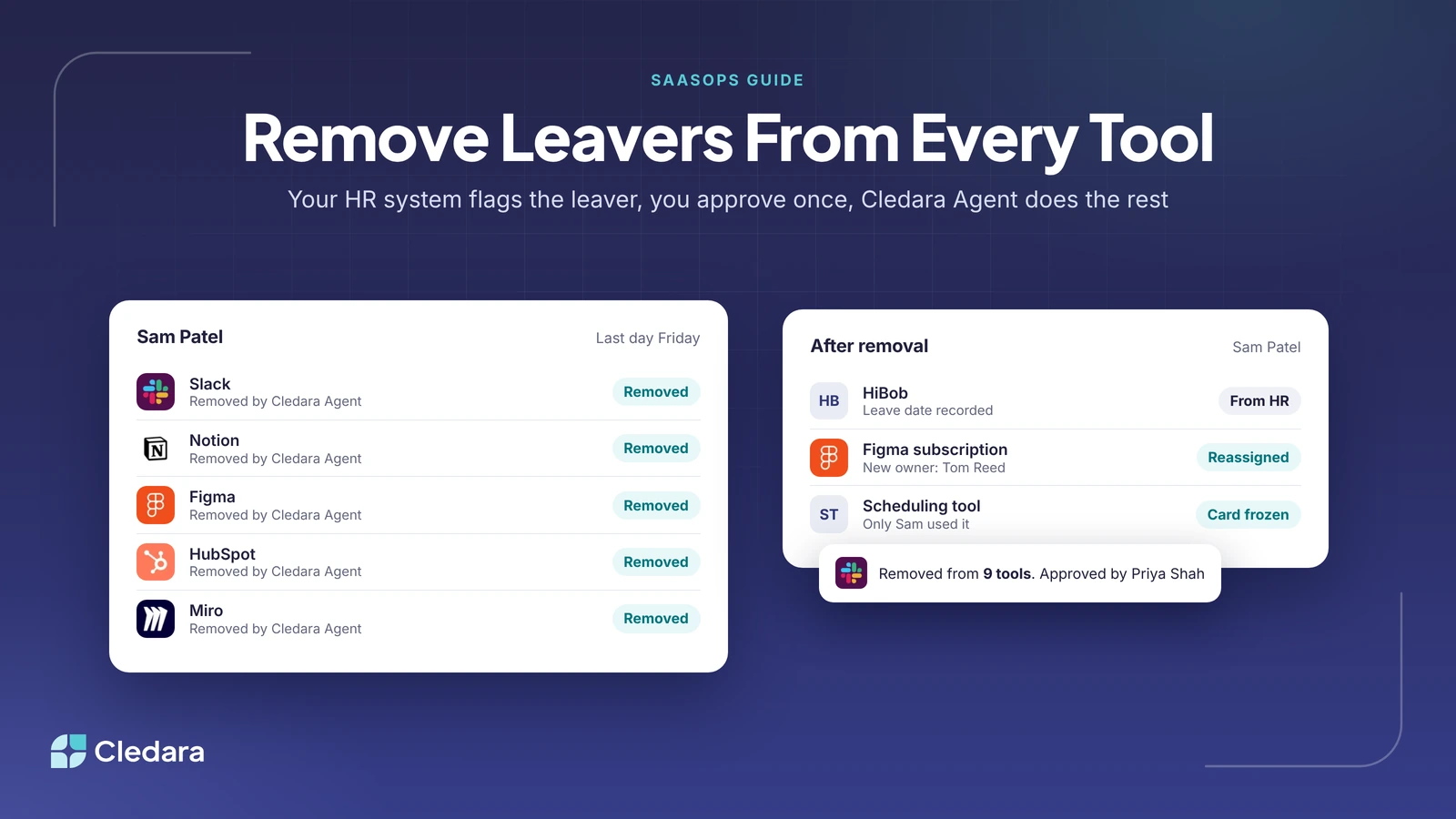
Sam Patel, an account manager at an illustrative 200-person company, hands in his notice, and his last day is Friday. HR records the date in HiBob, and Cledara lists the nine tools Sam had: Slack, Notion, Figma, HubSpot, Miro and Loom, plus two AI tools and a scheduling tool his team bought on a card.
On Friday, Priya Shah in IT approves once, and Cledara Agent removes Sam from all nine tools. Tom Reed becomes the owner of the Figma subscription Sam bought, and the card for the scheduling tool only Sam used is frozen, so it can't be charged again. Nobody chased a single tool owner.
Is it safe to let an agent remove users from your SaaS tools?
Yes, if the agent is limited to the tools and jobs you choose and its changes need approval. Cledara Agent only works in the tools you connect and only does the jobs you switch on, and each change waits for approval unless you set a standing approval for routine work such as removing leavers.
- It never changes account settings, never adds a paid seat without approval and never touches a tool you haven't connected.
- Sign-in details are stored encrypted in a separate vault for each company, and AI never sees passwords.
- It's the only SaaS management agent verified by Cloudflare: it's listed as a verified agent in Cloudflare's bot directory and signs its requests, so sites can check they really come from Cledara.
- Cledara is SOC 2 Type II certified and GDPR compliant. See the Trust Centre for details.
How Cledara automates employee offboarding, and onboarding too
Cledara is software subscription management for finance teams, and the same list that finance uses for every tool's owner, users, cost and renewal date drives offboarding. When someone leaves, Cledara already knows what they had and what each seat costs.
- Leavers removed from every tool. One approval, or a standing approval, and Cledara Agent does the rest.
- Joiners set up before day one. Cledara suggests the tools a new joiner's team uses, and the agent invites them to each one after you approve.
- Unused seats taken back. When a paid seat sits idle, Cledara recommends removing it and the agent takes it back once you approve (see how SaaS usage tracking shows who still uses each seat).
- A record of each change. Every request and approval sits in one place, which helps when you need to track SaaS admin changes for an audit.
A typical Cledara customer gets 30+ hours a month back, and customers save 23% on software spend on average. See how Cledara Agent removes leavers, or compare plans and add-ons. For the seats leavers leave behind, read our guide to unused SaaS licences.