


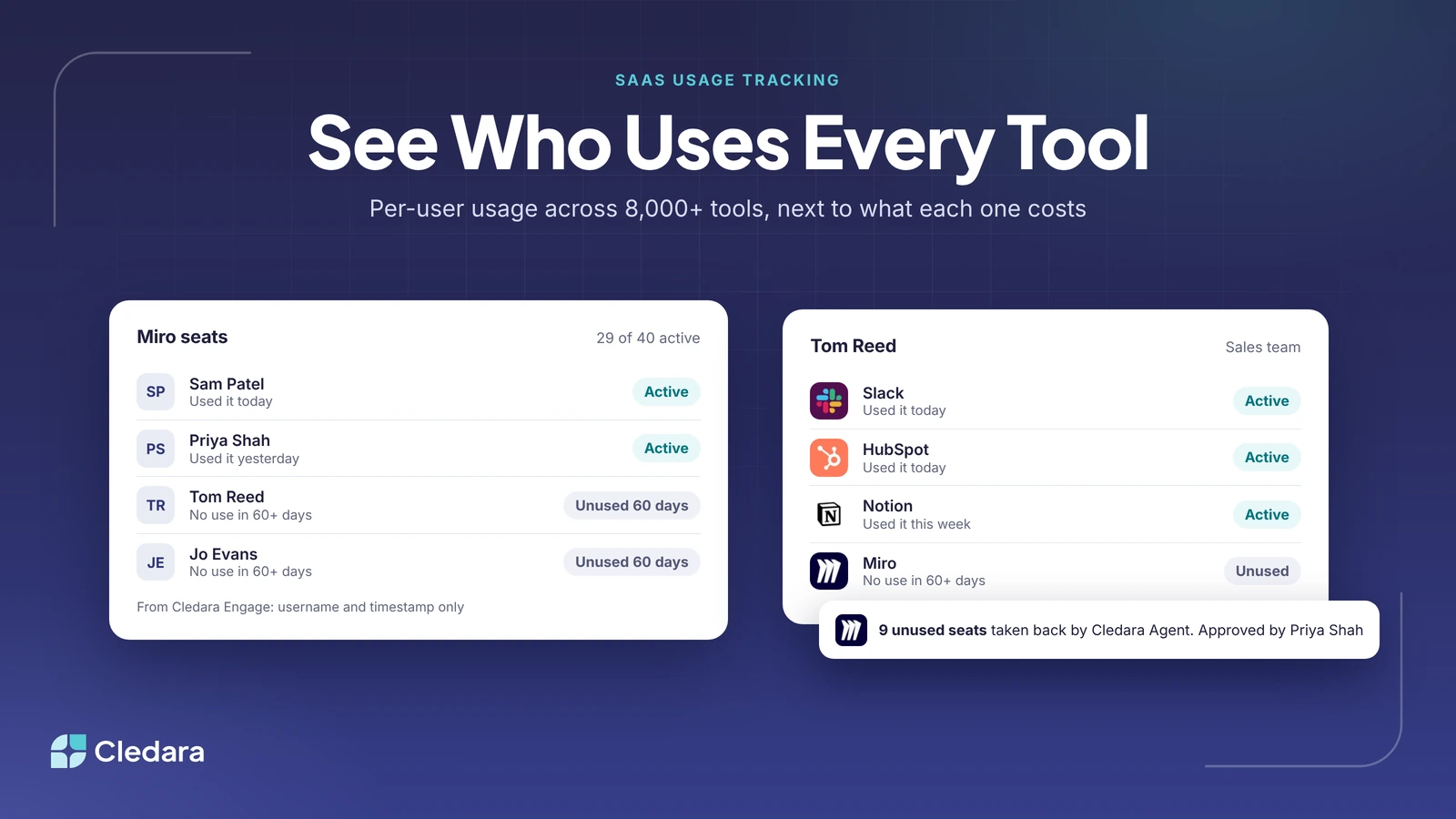
What is the best way to track SaaS usage?
The best SaaS usage tracking tool for most growing companies is Cledara: its Engage browser extension shows who uses each of 8,000+ software tools and when they last used it, including tools nobody approved. Cledara puts that usage next to what each tool costs, who owns it and when it renews, so finance and IT can take back the seats nobody uses.
SaaS usage tracking means knowing which tools people actually use, how often, and whether you pay for more seats than anyone uses. Across Cledara's customers between October 2025 and September 2026, the median company paid for 32 software tools (the middle half paid for 16 to 48), many bought by a team on a card rather than set up by IT. This guide compares the methods, eight tools and what a lean IT team should set up first.
Key takeaways
- Cledara Engage gives per-user usage for 8,000+ tools: who uses which tool and when they last used it.
- Engage collects only a username and a timestamp when someone uses a software tool, never browsing history, website content or passwords.
- SSO logs only see tools connected to your identity provider, and about a third of software spend goes to vendors outside the 50 biggest.
- Put usage next to cost, owner and renewal date, so someone acts on it.
- Count a seat as active if it was used in the last 30 days, and review the rest before the renewal.
- Lean IT teams should start SaaS usage tracking from payments and a browser extension, not tool-by-tool integrations.
- Cledara Agent takes back paid seats nobody uses, after your approval.
Which SaaS management tools offer app usage reporting for admins?
Cledara, Torii, Zluri, BetterCloud and 1Password SaaS Manager all offer app usage reporting for admins, and identity providers such as Okta report sign-ins for the apps connected to them. In Cledara, the reporting comes from Engage and shows usage two ways, by application and by person.
- By application: for each tool, whether it's being used, the share of users active in the last 30 days, its spend this month, its seat count and the people using it, with their visits over the past 30 days.
- By user: for each person, the tools they have, how many days they used each one in the last 30 days, and the tools they haven't touched in a month.
- Exports: both views export to CSV for seat reviews and renewals.
Tip: Ask any vendor to show you the per-user view for a tool you already pay for. A list of named people with the date each last used it is what lets you take a seat back.
What kinds of tools give IT teams visibility into SaaS usage across a company?
Four kinds of tool give IT teams visibility into SaaS usage: browser extensions, single sign-on (SSO) and identity provider logs, direct integrations with each vendor, and finance data from payments and expenses. Network tools that read firewall logs add a fifth, mainly for security teams. Each SaaS usage tracking method sees a different part of the stack, so most companies combine two or more.
The long tail is why SSO and integrations alone fall short. On Cledara, the 50 biggest software vendors take about two thirds of software spend, and the other third goes to thousands of smaller tools: 34% of software spend in the UK, 36% in Europe and 35% in the US went to vendors outside the top 50 between October 2025 and September 2026. Those smaller tools are often bought on a card by a team, outside IT's sign-in setup.
Key takeaway: Start with payments (every tool you pay for) and a browser extension (every tool people use). Together they cover the long tail that SSO logs and integrations miss.
Best SaaS monitoring tools with per-user reporting
The best SaaS monitoring tool with per-user reporting for most growing companies is Cledara, because Engage shows each person's use of every tool next to what that tool costs, and Cledara Agent can act on it. The others are good at different jobs, so pick by the problem you're solving.
1. Cledara: best for usage next to cost, with seats taken back
Cledara is software subscription management for finance teams. Cledara Engage shows which of 8,000+ tools the team actually uses, including ones nobody approved, with per-user usage: who uses which tool and when they last used it. Cledara builds one list of every tool from every payment made with Cledara plus the tools you add, with owner, users, cost, renewal date and card, so usage sits next to the bill.
When a paid seat sits idle, Cledara recommends removing it. You approve, and Cledara Agent signs in to the tool and takes the seat back. Software usage and seat utilisation insights come with the Spend Optimisation module, and shadow IT insights with IT Management (see plans and modules). Cledara is rated 4.6 out of 5 on G2 and is a G2 High Performer Mid-Market for Fall 2026.
2. Torii: best for IT-led discovery and workflows
Torii is a SaaS management platform for IT, procurement and security teams. It collects usage from direct integrations, SSO sign-ins, its browser extension (which gives application and user-level usage) and desktop agents. Freshworks signed an agreement to acquire Torii on 12 October 2026 to extend Freshservice into software management and AI spend governance; until closing, the two run as separate companies.
3. Zylo: best for enterprise SaaS and AI spend
Zylo calls itself an enterprise SaaS spend management platform, built for IT, procurement and FinOps leaders at large enterprises. It brings software spend, usage, AI consumption and contract data into one view, and has added purpose-built agents and an MCP server.
4. Zluri: best for identity security
Infotech (formerly Info-Tech Research Group), an IT research and advisory firm, completed its acquisition of Zluri on 14 October 2026, and Zluri runs as a standalone division. It now markets itself as an identity security platform, and collects data through browser extensions and desktop agents as well as SSO and direct integrations.
5. BetterCloud: best for IT lifecycle automation
BetterCloud describes itself as SaaS management and AI governance built around IT operations. Its no-code workflows cover onboarding, role changes and offboarding, and it finds unused licences and overlapping subscriptions so IT can reclaim seats before they renew. CoreStack announced its acquisition of BetterCloud on 31 March 2026.
6. 1Password SaaS Manager: best if you already use 1Password
According to 1Password, SaaS Manager discovers apps across identity providers, SSO logs, finance systems and browser extensions, and runs provisioning, deprovisioning, access reviews and offboarding across 400+ integrations. It's a natural shortlist option if your company already uses 1Password.
7. Okta Application Usage report: best for apps already behind SSO
If your core tools sit behind Okta, its Application Usage report shows who signed in to each app integration over a period, with each person's last sign-in. Okta keeps events for 90 days, and the report only covers apps connected to Okta.
8. Microsoft Defender for Cloud Apps: best for security teams
Defender for Cloud Apps' cloud discovery reads traffic logs from firewalls and proxies and checks them against a catalogue of more than 31,000 cloud apps, scoring each on more than 90 risk factors and identifying active users. It's built to find risky apps rather than manage seats and cost.
Note: Productiv, once a common pick for usage analytics, told customers on 2 August 2026 that it was shutting down on 6 August. If it's on an older shortlist, take it off.
What are the best browser-based SaaS monitoring tools?
The best browser-based SaaS monitoring tool for most companies is Cledara Engage, because it gives per-user usage across 8,000+ tools while collecting only a username and a timestamp. Torii and Zluri also offer browser extensions, and 1Password SaaS Manager uses browser extension data among its sources.
A browser extension is the SaaS usage tracking method that sees use where it happens, whether or not a tool is behind SSO or was ever approved, which is why it finds shadow IT. Before you roll one out, check:
- ✓ What it collects. Engage collects only the username and a timestamp when someone uses a software tool, and never browsing history, website content or passwords.
- ✓ Which sites it looks at. Engage only looks for addresses on Cledara's list of software tools, so the rest of a person's browsing stays on their device.
- ✓ Which browsers it supports. Engage works in all major browsers, including Chrome, Edge and Safari.
- ✓ How you'll explain it. Tell staff what is collected and why before it goes live.
How to track SaaS application usage effectively
Effective SaaS usage tracking starts from every tool you pay for, measures who uses each one, agrees what counts as active and gives every tool an owner who acts before it renews. In Cledara, that's one list built from payments, Engage for usage and Cledara Agent to take back the seats nobody uses.
- List every tool you pay for. Start from payments, cards and expenses, not from what IT set up.
- Roll out a browser extension to everyone. Engage shows which tools people use, including tools nobody approved.
- Add SSO and integration data for core tools. Use your identity provider's reports for tools behind SSO, and vendor admin reports for the big tools.
- Agree what "active" means. A simple rule is that a seat is active if it was used in the last 30 days, which is how Engage counts active users.
- Compare paid seats with active users. List the people who haven't used each tool in that time.
- Give every tool an owner. The owner decides whether an idle seat goes back, moves to someone else or stays.
- Act 90 days before the renewal. Companies that start negotiating 90 days out average 49% savings, against 19% when they start 30 to 90 days out.
- Take back the seats. Approve the removal and Cledara Agent takes the seat back, or freeze a tool's card to cancel it.
Worked example: one tool, 11 idle seats
Take an illustrative 150-person company paying for 40 seats of a whiteboard tool at £12 a seat a month. Engage shows 29 of the 40 people used it in the last 30 days, and the other 11 haven't used it for more than 60 days. The tool's owner, Priya Shah, confirms nine of the 11 can go. Cledara Agent removes them once she approves, and the company renews at 31 seats.
That's nine seats at £12 a month, or £1,296 a year, from one tool. A typical company has another 31 tools to review the same way; our guide to finding unused and duplicate subscriptions covers the rest of the review, and SaaS licence optimisation covers seat counts and contracts.
What are the best SaaS visibility tools for lean IT teams?
For a lean IT team of one or two people, Cledara is the best SaaS visibility tool: it builds the list of every tool from payments, so there's nothing to connect tool by tool, and Engage adds per-user usage. Set-up takes days, not months, and every plan includes set-up help. Set up SaaS usage tracking in this order:
- First: every tool and its owner. Pull the list from payments and name an owner for each tool.
- Second: usage. Roll out Engage to every browser, then go through the tools nobody approved.
- Third: leavers. Connect your HR system so a leave date lists every tool the person had, and let Cledara Agent remove leavers from every tool after one approval.
- Every month: renewals and seats. Use renewal alerts and the per-tool usage view to cut seats before each renewal.
Tip: Leave deep integrations until later. Payments plus a browser extension cover most of the stack within days, including AI tools people signed up for on their own (see how to find the AI tools already in your stack).
How Cledara does SaaS usage tracking, and acts on it
Cledara is software subscription management for finance teams, and SaaS usage tracking is one part of what it does. The point isn't a usage chart: it's that someone owns each tool and the seats nobody uses come back.
- Engage for usage. Per-user usage across 8,000+ tools, collecting only a username and a timestamp.
- One list for cost. Every tool, with owner, users, cost, renewal date and card, built from every payment.
- Cledara Agent for action. Takes back paid seats nobody uses and removes leavers from every tool, after your approval. It's the only SaaS management agent verified by Cloudflare.
- Spend Optimisation for the bill. Flags duplicate tools, unused seats and price increases, and benchmarks what you pay against similar companies.
Customers save 23% on software spend on average, and a typical customer gets 30+ hours a month back. See Cledara Engage, Cledara Agent and plans and pricing.