


What are the best tools to identify unused or duplicate SaaS subscriptions?
Cledara is the best tool to identify unused and duplicate SaaS subscriptions: Cledara Engage shows when each person last used each tool, the Spend Optimisation module flags duplicate tools and unused seats, and Cledara Agent takes back the paid seats nobody uses. When a whole tool is no longer needed, you freeze its card in one click and the vendor can't charge it again.
Unused SaaS subscriptions are tools and seats you pay for that nobody uses. Duplicates are two tools paid for the same job. Both are hard to see from a card statement, because every line looks justified on its own. This guide shows how common the overlaps are in Cledara's data, how to find unused SaaS subscriptions step by step, and how the other methods compare.
Key takeaways
- Cledara finds unused and duplicate subscriptions in one place: last-used dates per person from Engage, duplicate and unused seat flags from Spend Optimisation, and seat clean-up by Cledara Agent.
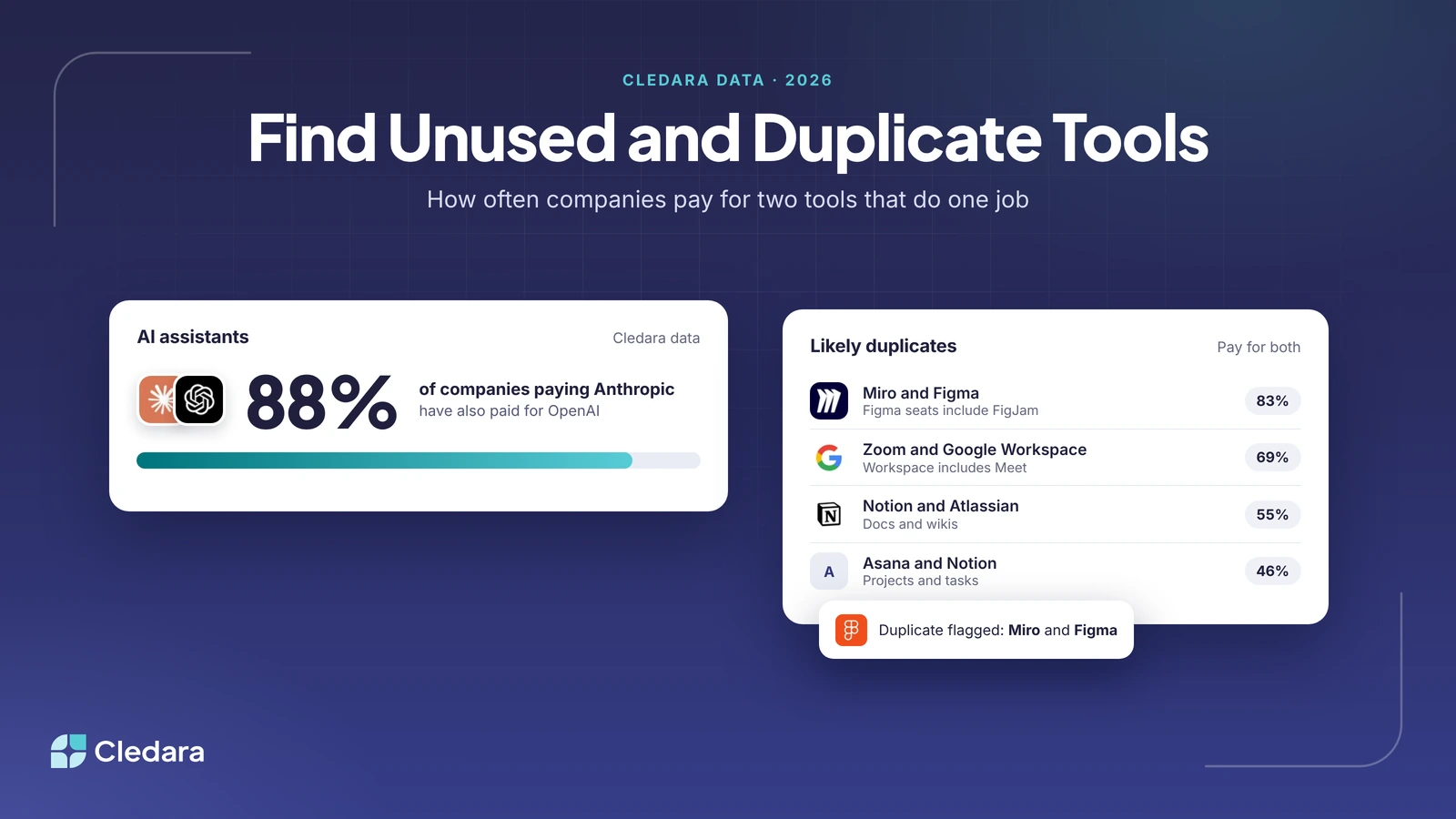
- Overlaps are common: 88% of companies that have paid for Anthropic have also paid for OpenAI, and 83% of companies that have paid for Miro have also paid for Figma, whose paid seats include FigJam whiteboards.
- Start from payments, not from a survey: every recurring payment is a subscription, including the ones nobody mentions.
- Use last-used dates per person, not seat counts, to call a seat unused.
- Not every overlap is waste. Ask the owners before you cancel, then cancel at the right time in the contract.
- Freezing a subscription's card stops the payment, but give notice first if you're inside a committed term.
How Cledara finds unused SaaS subscriptions and duplicate tools
Cledara finds unused SaaS subscriptions by putting every tool you pay for on one list and adding who actually uses it. Cledara is software subscription management for finance teams: the list is built from every payment made with Cledara plus tools you add, with each tool's owner, users, cost, renewal date and card. Four features then do the finding and the clean-up.
Cledara Engage: who used each tool, and when
Cledara Engage is a browser extension that shows which of 8,000+ tools your team actually uses, including ones nobody approved. It gives per-user usage: who uses which tool and when they last used it. It collects only the username and a timestamp when someone uses a software tool, never browsing history, website content or passwords, and it works in all major browsers.
Spend Optimisation: duplicate tools, unused seats and price increases
The Spend Optimisation module flags duplicate tools, unused seats and price increases, and benchmarks what you pay against what similar companies pay. Its Negotiation and Renewal Copilot (AI) drafts the renewal negotiation when you decide to keep a tool but pay less for it.
Cledara Agent: takes back seats nobody uses
Cledara Agent signs in to your SaaS and AI tools and does the admin inside them, in 8,000+ tools, whether or not they have an integration. With its User Management job switched on, it takes back paid seats nobody uses and removes leavers from every tool they had. Each change waits for your approval, unless you set a standing approval for routine work.
One-click cancelling and renewal alerts
Every subscription has its own virtual card. To cancel a tool, freeze its card and the vendor can't charge it again. For tools you keep, each subscription has a named owner and Cledara alerts that owner and finance before it renews, so the next renewal is a chance to cut seats rather than a surprise. Our guide to SaaS renewal tracking covers that side.
How common are duplicate SaaS subscriptions?
Duplicate SaaS subscriptions are common. In Cledara's purchase data, most companies that pay for one AI assistant, whiteboard or video tool also pay for another tool that can do much of the same job. The table shows the share of companies that have paid for the first tool and have also paid for the second.
Source: Cledara purchase data via data.cledara.com, 3 November 2026. Cledara groups each vendor's products together, so "Microsoft" and "Atlassian" include all their products, not only Teams or Confluence. Plan details from Figma and Google Workspace.
The biggest overlaps sit between a specialist tool and a suite that already includes something similar, which is exactly where a duplicate is easy to miss.
Note: not every overlap is waste. Teams may use each tool for different work, or be part-way through a switch. The point of the data is to show where to look first, then ask the owners.
How to find unused SaaS subscriptions in seven steps
To find unused SaaS subscriptions, list every tool from your payments, add usage per person, flag seats and tools nobody uses, check for duplicates, ask each owner, then cancel or downsize before the next renewal. Here is the order that works, with what Cledara does at each step.
- List every tool from payments. Export 12 months of software payments from cards, expenses and your accounting system, or let Cledara build the list from every payment made with it. Every recurring payment is a subscription.
- Give each tool an owner. One named person who can say whether it's still needed. A tool without an owner is the most likely to be unused.
- Add usage per person. Use Cledara Engage to see who used each tool and when they last used it. Combine with vendor admin reports for tools where you need feature-level detail.
- Flag unused seats and tools. Treat a seat with no use in 30 days as unused for daily tools such as chat and email, and give specialist tools 60 to 90 days. A tool where nobody has used any seat is a cancel candidate.
- Flag duplicates. Group tools by job: AI assistants, video calls, whiteboards, docs and project tracking. Spend Optimisation flags duplicate tools for you.
- Ask before you cut. Send each owner their list and give them a deadline to reply. That protects people on leave and tools used once a quarter.
- Cancel, downsize or keep. Take back unused seats (Cledara Agent can do this with your approval), give notice on tools you're dropping, and freeze the card so the vendor can't charge it again.
A worked example
Here is how it might look, with illustrative figures. Tom Reed, finance manager at a 150-person company, runs the review across 32 tools, the median number on Cledara. Engage shows two tools nobody has used in 90 days and 40 unused seats spread across six others. Spend Optimisation flags two pairs of duplicates: two AI assistants and two whiteboard tools.
Tom sends each owner their list. Within two weeks he freezes the cards of the two unused tools, Cledara Agent takes back 31 of the 40 seats after the owners approve, and the design team agrees to move whiteboards into FigJam at Miro's next renewal. The AI assistants stay, because engineering and sales use them for different work, but the seat counts come down.
Tip: record the saving per tool as you go. It makes the next review faster and gives you a number for the next budget.
Other ways to find unused SaaS subscriptions
You can also find unused SaaS subscriptions from card statements, single sign-on (SSO) logs, vendor admin reports or another SaaS management platform. Each sees part of the picture, so most teams combine at least two. Here is what each shows and what it misses.
Two other SaaS management platforms worth knowing:
- Torii: best for IT-led licence clean-up. Torii matches licences to usage, flags inactive, abandoned and duplicate seats, and runs workflows to reclaim them (Torii). Freshworks agreed to acquire Torii in October 2026 (Freshworks).
- Zluri: best for teams buying identity governance as well. Zluri now presents itself mainly as an identity security company, and its SaaS management platform covers shadow IT, software spend and renewals (Zluri).
Whichever you use, finding the waste is half the job. Our guides to SaaS licence optimisation and SaaS consolidation cover cutting seats and choosing one tool per job, and our round-up of SaaS usage tracking tools compares ways to get per-user data.
Checklist for unused and duplicate subscriptions
Run this checklist every quarter, and for each tool 90 days before it renews. If you can tick every line, you're not paying for tools nobody uses.
- ✓ Every tool you pay for is on one list, built from payments.
- ✓ Every tool has a named owner.
- ✓ Last-used dates are checked per person, not just seat counts.
- ✓ Seats with no use in 30 days (or 60 to 90 for specialist tools) are flagged.
- ✓ Tools are grouped by job, and duplicates are flagged.
- ✓ Owners have confirmed what to keep before anything is cut.
- ✓ Unused seats are taken back and seat counts lowered with the vendor.
- ✓ Cancelled tools have notice given and their card frozen.
- ✓ Savings are recorded per tool.
Cledara customers save 23% on software spend on average. See how Cledara manages every software subscription, or compare plans and add-ons.