


How do I prepare for a Salesforce renewal?
Start preparing for your Salesforce renewal 90 to 120 days before the renewal date. Three things decide how it goes: knowing which licences and editions your team actually uses, knowing what your contract says (Salesforce's standard terms renew for another year unless you give written notice at least 30 days before the term ends), and arriving with benchmarks and a real alternative.
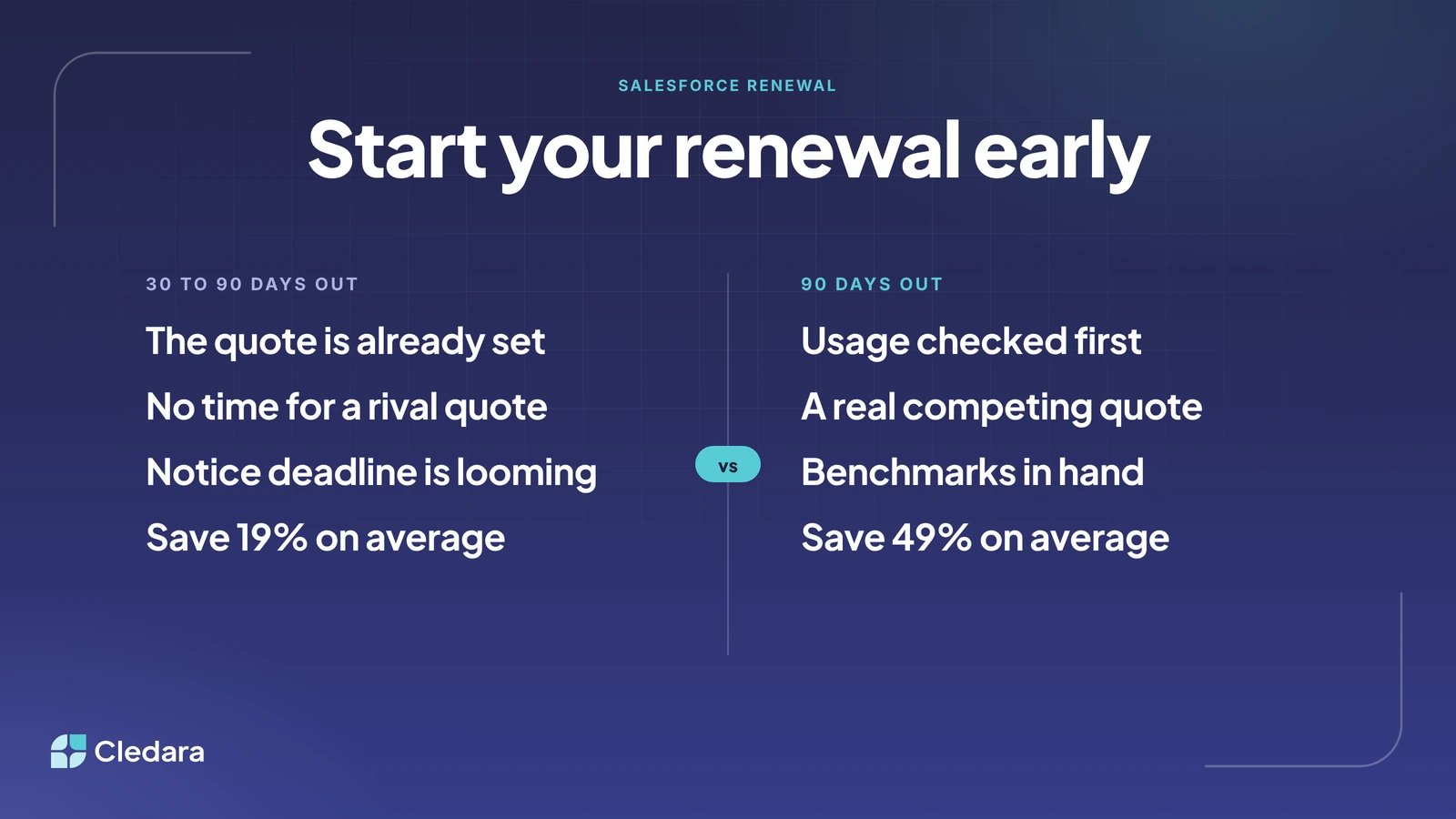
The timing matters more than most people think. Start renewal talks 30 to 90 days out and you save 19% on average. Start them 90 days out and you save 49% on average (Cledara renewal benchmarks, 2026). Same vendor, same product, very different conversation!
Here's a funny thing about big renewals. The date is in the contract from the day you sign, yet it still sneaks up on most of us. By the time anyone looks, the quote is already set, there's no time for a rival quote and the notice deadline is looming. Start 90 days out and the order flips: usage checked first, a real competing quote, benchmarks in hand.
Key takeaways
- Start your Salesforce renewal 90 to 120 days out: early starters save 49% on average, against 19% for later starters.
- Salesforce's standard agreement renews subscriptions for one-year terms unless either side gives written notice (email is fine) at least 30 days before the term ends.
- You can't cut licences mid-term, and a renewal with fewer licences or a shorter term is re-priced, so go in with benchmarks.
- Promotional or one-time prices renew at Salesforce's list price unless your order form says otherwise.
- Your order form overrides the standard agreement, so read it first.
- The levers: licences and editions actually used, term length, timing against Salesforce's quarter, a competing quote and benchmarks.
What does Salesforce's contract say about renewal?
Salesforce's standard Main Services Agreement (MSA) says subscriptions renew automatically for one more year unless either side gives written notice at least 30 days before the term ends, and email counts. Your order form can change any of this, and it wins if the two disagree, so read your own order form before you plan anything. Here's what the current MSA (last updated 15 October 2026) says about a Salesforce renewal:
Note: This is a plain-English summary of Salesforce's published MSA, not legal advice. The MSA puts your order form first if the two conflict, and some regions have their own versions (see Salesforce's customer agreements page), so check your own order form and confirm anything material with your legal team.
When should you start preparing for a Salesforce renewal?
Start 120 days before the Salesforce renewal date and aim to agree terms well before the 30-day notice deadline. That gives you about a month to understand what you use, a month to line up alternatives and benchmarks, and a month to negotiate, with the notice deadline as a backstop. Here's the timeline I'd use:
Tip: Put the notice deadline in the calendar, not just the renewal date. Under Salesforce's standard terms, the day that matters is 30 days before the term ends. Our guide to preventing SaaS auto-renewals has more on this.
What levers do you have at a Salesforce renewal?
You have five levers at a Salesforce renewal: the licences and editions you actually use, term length, timing against Salesforce's quarter, a competing quote and benchmarks. Used together, they turn a renewal from a price you're told into a price you agree.
- Licences and editions actually used. Under the MSA, fees are "based on Services subscriptions purchased and not actual usage" (section 5.1), so every licence held by someone who never logs in is money out the door. Ask your admin for login activity by user, and check whether people on a higher edition use the features that justify it. This is the biggest lever, and the one you fully control.
- Term length. A longer term usually buys a better price. Cledara's renewal benchmarks put the saving on a three-year deal at 15 to 25%, but you're locked in, so only go long on licences you're sure you'll keep. Whatever term you pick, ask for a cap on the rise at the following renewal.
- Timing against Salesforce's quarter. Salesforce's financial year ends on 31 January (its second quarter of fiscal 2027 ended on 31 July 2026), so its quarters end on 30 April, 31 July, 31 October and 31 January. If your renewal lands near one of those dates, your account team has a deadline too.
- A competing quote. Only worth it if switching is genuinely on the table, and account teams can tell. In Cledara's data, HubSpot was the 6th-largest software vendor by spend in October 2026, and Attio climbed from 560th to 219th by spend between November 2025 and October 2026, so there are real options for many teams.
- Benchmarks. Renewal prices rise 8 to 12% a year on average, and 15 to 25% with aggressive vendors. Know what similar companies pay before you see the quote: here's how to benchmark SaaS pricing before a renewal, and there are free benchmarks at data.cledara.com.
What does Cledara's data say about Salesforce spend?
In Cledara's data, Salesforce is a big-ticket tool: in October 2026 it ranked 45th by software spend but 224th by popularity. That gap means fewer, bigger bills, so each Salesforce renewal is a large line on its own and deserves its own 120-day plan.
Salesforce is also mostly billed in big chunks. Across all Salesforce payments on Cledara to November 2026, 75% of spend in the US, 89% in the UK and 91% in Europe was billed yearly or quarterly rather than monthly. Big invoices that only arrive once or twice a year are easy to forget between renewals.
Its share of software spend on Cledara has more than halved since early 2024, from about 0.73% in January 2024 to 0.33% in October 2026, while AI-native tools have grown to 27% of software spend, up from about 3% two years ago. Budgets are moving, and a renewal is the natural moment to decide where yours should go (more at data.cledara.com).
How does Cledara help you prepare for a Salesforce renewal?
Cledara is software subscription management for finance teams. It keeps every renewal date and price in one place and alerts you before each one, so your Salesforce renewal shows up at 120 days rather than in a worried email at 20:
- Renewal alerts: every renewal date, price and owner on one list, with an alert before each renewal.
- Last-used data: Cledara shows when each tool was last used and by whom, so unused seats show up before the quote does.
- Benchmarks: compare what you pay with what similar companies pay, with duplicate tools, unused seats and price increases flagged.
- Negotiation and Renewal Copilot: drafts your renewal negotiation, so you start from a position rather than a blank page.
- Cledara Agent: takes back paid seats nobody uses and removes leavers in Salesforce and 8,000+ other SaaS and AI tools. Each change waits for your approval unless you set a standing approval.
Customers have saved 23% on software spend on average with Cledara. For the wider process across every tool, read our guide to SaaS renewal management, and if HubSpot is next on the list, here's how to prepare for your HubSpot renewal. Plans are on our pricing page.
What's the one thing to do for your Salesforce renewal this week?
Find your Salesforce order form and put two dates in the calendar: the 120-day mark and the 30-day notice deadline. That's it. Start your renewal early and everything else in this post gets easier, because you'll have time to look at usage, talk to alternatives and negotiate on your terms rather than theirs.
Honestly, renewals are a lot more fun when you set the pace. If you'd like to see how Cledara keeps every renewal on one list and does the admin around it, book a demo and we'll show you.
Cheers,
Brad