


What is the best SaaS spend management that integrates with NetSuite?
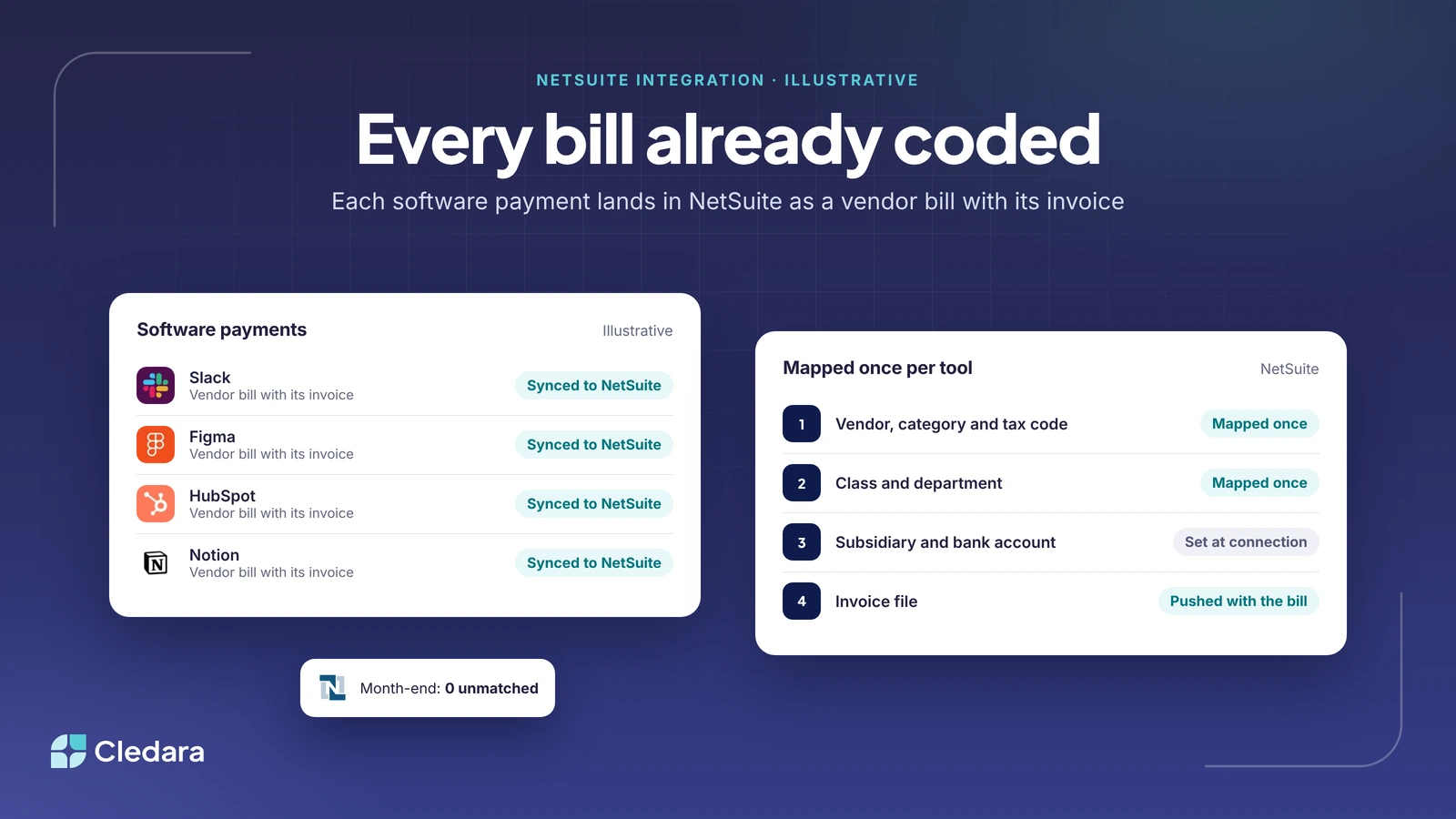
The best SaaS spend management that integrates with NetSuite writes each software payment into NetSuite as a vendor bill, with its bill payment, invoice file and codes, under the right subsidiary, so nobody keys it in at month-end. Software subscription management tools such as Cledara do that for every subscription paid through them. Zylo, Torii and Zluri read spend out of NetSuite to find your software, and Vertice and Tropic push purchase orders into it.
So a SaaS spend management NetSuite integration isn't one thing. Ask each vendor which way the data flows: if your pain is the close, you want the first kind. (At Cledara we call the category software subscription management, because the subscription is the thing you manage.)
The median company in Cledara's data pays for 32 software tools (the middle half pay for 16 to 48), and 90% of software transactions are monthly subscriptions (October 2025 to September 2026). That's roughly 30 bills a month, each needing a vendor, a category, a tax code, a department and an invoice. By the time you're on NetSuite you've usually added subsidiaries and currencies too.
Key takeaways
- A SaaS spend management NetSuite integration should create the vendor bill, the bill payment and the invoice file for each software payment.
- Ask every vendor which way the data flows: some read spend from NetSuite, some push purchase orders, some write coded vendor bills.
- Cledara maps each tool once to its NetSuite vendor, category, tax code, class and department, and every later payment is coded the same way (NetSuite is included from the Premium plan).
- The connection is set per subsidiary, with a NetSuite bank account for each currency you hold.
- Invoices that are never emailed are what slow the close. Cledara Agent collects them from the vendor's billing page overnight.
What a SaaS spend management NetSuite integration should sync
A NetSuite integration for software subscriptions should sync five things for every payment: the vendor bill, the bill payment, the invoice file, the codes (vendor, category, tax code, class and department), and the right subsidiary and bank account. NetSuite can already hold all of this; the question is who fills it in. Here's NetSuite on its own next to what Cledara's integration sends, per our help centre.
Bank feeds versus vendor bills
NetSuite's own tools are good at what they do. The Bank Feeds SuiteApp brings bank data in every day for reconciliation, and Bill Capture turns a bill you email or upload into a vendor bill to review. Neither can know which subscription a card line belongs to, who owns it, or where the invoice is hiding. Cledara starts from the subscription, so the bill arrives already knowing what it is.
Subsidiaries, currencies, classes and departments
The set-up runs in this order.
- Connect, and pick the subsidiary (usually the entity your workspace is for).
- Choose a bank account and an invoice folder for each currency you hold.
- Map each tool once (Slack, Figma, HubSpot, Notion and the rest) to its vendor, category, tax code, class and department.
- Decide whether class and department sit on the bill line (the default) or the header.
- Choose, per tool, whether the bill payment and the invoice file are pushed with the bill.
From then on, each software payment lands in NetSuite as a vendor bill with its invoice, and if NetSuite can't take a push straight away, Cledara tries again every hour. Cledara also pulls your chart of accounts and tax codes from NetSuite, so people only pick codes that exist.
Tip: before the first sync, ask your NetSuite administrator whether vendor bills carry mandatory custom fields. The steps are in our NetSuite set-up guide, and if you have mandatory custom fields or run several subsidiaries, tell us at the start.
Invoice files
The invoice is the bit that goes missing. Cledara captures invoices three ways: email capture from Gmail or Microsoft 365 (from Premium), a forwarding inbox, and Cledara Agent for the ones that only live behind a login. Each is matched to its payment and synced to NetSuite with the bill. Marshmallow's Head of Finance says her team used to waste 1 to 2 full days a month on invoices before it was automated (their story).
SaaS spend management tools that integrate with NetSuite, compared
Six tools come up when buyers ask for SaaS spend management that integrates with NetSuite, and they connect in three ways: one writes coded vendor bills into NetSuite, three read spend out of it, and two push purchase orders. Here's what each vendor's own site says its NetSuite connection does.
Spend tools such as Ramp, Brex, Pleo, Spendesk and Payhawk cover cards and expenses, and most publish a NetSuite connector of their own; they stop at the subscription itself (its owner, renewal, invoice and access).
The best SaaS spend management that integrates with NetSuite, by role
The best SaaS spend management NetSuite integration for any role is the one that removes that person's monthly chore: the software line for the CFO, the access list for the CIO, the close for the controller and the renewal for procurement. Here's each seat.
For a CFO
A CFO should pick the platform that controls software spend before it happens and books it in NetSuite without a person in the loop: approvals before a tool is bought, a limit on every subscription, and a software line you'd defend to the board. Cledara customers save 23% on software spend on average, and renewal prices rise 8 to 12% a year on average.
For a CIO
A CIO should pick the platform where the subscription list is also the access list: one record per tool showing who has access, with joiners and leavers driven by the HR system. Cledara Agent sets up new joiners and removes leavers from every tool they had, after approval, across 8,000+ SaaS and AI tools. It's the only SaaS management agent verified by Cloudflare.
For a controller
A controller should pick the integration that makes the close stop depending on other people. Every software payment arrives as a vendor bill with its codes set and its invoice file attached, and you choose whether the bill payment is pushed too or bills stay Open for your own approval flow. Month-end becomes a short exceptions list, and the number to aim for is 0 unmatched. See reconciling card transactions and collecting every software invoice.
For a procurement professional
A procurement professional should look for intake and renewals, with NetSuite as the place the result is booked. In Cledara, requests route by rules you set, and every renewal date and price sits in one place with alerts. Companies that start negotiating 90 days before renewal average 49% savings, against 19% for 30 to 90 days out (Cledara's renewal benchmarks). If you need a purchase order raised in NetSuite before every purchase, Vertice and Tropic are built around that.
SaaS spend management NetSuite integration by company size
Company size mostly changes how much of NetSuite's structure the integration has to respect. A startup needs it quick, a mid-market company needs subsidiaries and departments right, and an enterprise needs it to fit controls that already exist.
For a startup or growth stage company
If you've just moved to NetSuite, keep it simple: one subsidiary, one dedicated bank account for software payments, and each tool mapped once. Still on Xero or QuickBooks Online? They're the two most used accounting systems across Cledara customers (October 2026), both are on every Cledara plan, and our Xero guide and QuickBooks guide cover them.
For a mid-market company
A mid-market company should look for three things: a connection that respects subsidiaries and currencies, coding by class and department that's set once, and invoice collection that doesn't rely on chasing people. One company in four in Cledara's data pays for 48 or more software tools, and a typical customer gets 30+ hours a month back.
Note: Cledara's native accounting connections are Xero, QuickBooks Online, NetSuite and Tripletex. For Microsoft Dynamics and other systems, invoices are still matched to payments automatically, and transactions and invoices export as CSV.
For an enterprise
An enterprise should shortlist by the job, then check the fit with controls it already has. Discovery from finance data points to Zylo, Torii or Zluri, purchase orders point to Vertice or Tropic, and subscriptions booked in NetSuite with the admin done points to Cledara. Then ask whether bills can stay Open for approval in NetSuite, how each subsidiary connects, and how sign-in works (Cledara offers Okta SSO on the Pro plan).
SaaS spend management that integrates with NetSuite for healthcare and other regulated industries
For healthcare, financial services and other regulated industries, the best option is the same SaaS spend management NetSuite integration with three things turned up. Those are stricter approval before a tool is bought, a record of what data each tool touches, and an audit trail from purchase to cancellation.
In healthcare the question before any purchase is what patient data a tool will see. Cledara's approval flows route requests by rules you set, and the Software Compliance module holds a questionnaire you can delegate to the tool's owner, with vendor ISO 27001 and SOC 2 tags on its record.
Important: this is general guidance, so confirm what your own regulator and auditor expect.
The demo checklist for a SaaS spend management NetSuite integration
Ask the vendor to push one real software payment into a NetSuite sandbox while you watch. Then open the bill and run these eight checks.
- ✓ Does the integration read from NetSuite, write to it, or both? What exactly gets created?
- ✓ Does each payment arrive as a vendor bill with its bill payment, and can we hold the payment back for approval in NetSuite?
- ✓ Is the invoice file pushed with the bill, and into which folder?
- ✓ Are vendor, category, tax code, class and department mapped once per tool?
- ✓ Which subsidiary does it connect to, and what happens with our other entities and currencies?
- ✓ Do our vendor bills have mandatory custom fields, and how are they handled?
- ✓ How are invoices collected when the vendor never emails them? Ask to see Cledara Agent collect one.
- ✓ Which plan includes NetSuite? (With Cledara it's Premium and Pro; see pricing.)
Key takeaway: if the demo can't show a payment, its invoice and its codes arriving in NetSuite together, someone on your team will still be doing that part by hand.
What are the best accounting automation options that integrate with NetSuite for SaaS?
There are three accounting automation options for software subscriptions in NetSuite: NetSuite's own Bank Feeds and Bill Capture, a SaaS spend management NetSuite integration that writes coded vendor bills, and a CSV import for anything unusual. NetSuite's own tools suit a handful of subscriptions; past a couple of dozen, the invoice hunt becomes the job. Our guide to getting software spend into the ledger compares NetSuite with Xero, QuickBooks, DATEV and Fortnox.
Where this is heading
Not that long ago, plenty of finance teams typed bank statements into the accounts by hand. Then bank feeds arrived and nobody went back. Software subscriptions are at that point now. NetSuite can hold every detail about a bill; it's the finding, coding and attaching that a person still does, 32 tools at a time.
I think the finance teams that win will hand that work to software and spend the hours on finance instead. Honestly, nobody moved to NetSuite to do more data entry!
More than 1,000 companies in 32 countries manage their software with Cledara. If you'd like to watch one of your own payments land in NetSuite, every bill already coded and with its invoice attached, book a demo and bring your trickiest vendor.
Cheers,
Brad