


Every finance team has a software subscription register. It's just called "Subscriptions v7 FINAL"
Every finance team I've met has a spreadsheet of what the company pays for. It's usually called something like "Subscriptions v7 FINAL" (sometimes "FINAL FINAL"), it was last updated the week before the audit, and nobody trusts it. That spreadsheet is a software subscription register. It's just not a very good one.
A software subscription register is one list of every software and AI tool the company pays for, with who owns it, who uses it, what it costs, how it's billed and when it renews. Software subscription management platforms such as Cledara build and keep that list for you, straight from the payments. This post is about the list itself: what goes in it, how to build one from 12 months of payments, how to keep it current, and the point where a spreadsheet stops being enough. There's a template to copy halfway down.
Key takeaways
- A software subscription register is one row per tool with an owner, users, cost, billing cycle, renewal date, notice period, contract term, payment method, approval status, category and last used.
- The median company on Cledara pays for 32 software tools (the middle half pay for 16 to 48), and 90% of software transactions are monthly subscriptions. Most of your renewals are happening every 30 days whether you track them or not.
- You can build v1 in an afternoon from 12 months of bank, card and accounting data. The hard columns are owner and last used.
- Sort by renewal date. Anything inside 90 days goes on this month's agenda: companies that start negotiating 90 days out average 49% savings, against 19% for those that start 30 to 90 days out.
- A register that isn't updated monthly is a historical document. The monthly routine takes about an hour.
- A platform takes over when the list should update itself: new tools appear from the payments, usage fills in on its own, and renewals become a decision rather than a charge.
What is a software subscription register?
A software subscription register is a single list of every software subscription a company pays for, one row per tool, with the owner, number of users, cost, billing cycle, renewal date, notice period and contract term alongside it.
The word "register" matters. A list of payments isn't a register, because three Slack charges are one tool. A list of logins isn't a register, because it has no costs or renewal dates. A register is the thing in the middle: the tools, with the money and the people attached. Once you have it, most software questions become a sort or a filter: which tools renew next quarter, who do I ask about Figma, are we paying for two whiteboard tools?
How we got here: why the software subscription register became a finance job
Not that long ago, software was bought by IT, and there was a person whose actual job was to know what the company ran on. Then software moved to the browser, pricing moved to monthly, and buying moved to whoever had a company card. Marketing bought HubSpot, product bought Figma, engineering put Cursor and Anthropic on a card and expensed it. Fair enough, that's how modern companies move quickly.
The side effect is that nobody is in charge of the list any more. The median company on Cledara pays for 32 software tools, and the middle half pay for anywhere from 16 to 48 (Cledara data, October 2025 to September 2026). They were bought by a dozen people on a dozen different days, and the only place they all show up together is the bank statement. That's why the software subscription register quietly became a finance job: finance is the only team that sees every payment.
What it costs when nobody keeps the software subscription register
The cost of not keeping the software subscription register is mostly invisible, which is why it persists. Nobody sends an invoice for "renewal you forgot to negotiate". Renewal prices rise 8 to 12% a year on average, and 15 to 25% with the more aggressive vendors. If the renewal date isn't in a list, the increase just lands, and you find out at month-end.
Then there's the people cost, which is the one I actually care about. Without a register, finance spends month-end chasing: who approved this? Is it still used? Who has the login? The people being chased hate it just as much. And every hour finance spends being the battlefield IT manager is an hour not spent on finance. The concrete consequences:
- Renewals that fire with no decision, often at a higher price, with the notice period already gone.
- Two tools doing the same job in two teams. Across Cledara customers, 75% of companies paying for Canva also pay for Adobe, and 69% of those paying for Zoom also pay for Google Workspace.
- Leavers still on paid seats, and still with access to your data.
- Tools nobody knew about. When Jiminny's finance team put everything in one place, they captured an extra 15% of subscriptions they didn't know they were paying for.
- Invoices not collected, VAT not reclaimed and the books closing late, because step one of each of those jobs is knowing the tool exists.
The 12 fields every software subscription register needs
A good software subscription register has about 12 fields. Fewer and you can't act on it; more and nobody fills it in. The first six are the ones you sort and filter by, and the second six tell you what to do about a row.
Tip: if you only have time for three columns, make them owner, renewal date and cost. That's already better than most "v7 FINAL" spreadsheets I've seen.
How do I track all our software renewals in one place?
Build the software subscription register from 12 months of payments, not from memory. Memory gives you the tools people are proud of; payments give you all of them, including the ones on personal cards. It takes an afternoon the first time. (The worked figures below are illustrative.)
- Export 12 months of payments. Every card transaction, bank payment and expense claim for the last year. Xero is the most used finance tool across Cledara customers, so for a lot of readers this is a Xero export plus the card statements. Twelve months, because annual tools only appear once.
- Keep the vendors that repeat. Anything charged more than once is a subscription until proven otherwise. 90% of software transactions are monthly subscriptions, so the pattern is easy to spot: same vendor, similar amount, about 30 days apart. The big single payments are your annual contracts.
- Collapse it to one row per tool. Twelve Slack charges become one Slack row with an annual cost. A median company ends up with around 32 rows. If you end up with 60, you're not wrong, just further along than you thought.
- Find the owner. Whose card paid, who the invoice emails go to, who uses it most. One message in Slack usually settles it. Write a person's name, not a team.
- Fill in renewal date, notice period and contract term. For monthly tools the renewal date is the next billing date and the notice period is "before the next charge". For annual tools, read the contract or the billing page, and write the real deadline: a 12 January renewal with 60 days' notice is really a 13 November decision.
- Add users and last used. Both come from each tool's admin page. This is the slow part, so do your 10 most expensive tools first.
- Add approval status and category. Mark anything you found in the payments that nobody signed off as "never approved". Then sort the whole thing by renewal date.
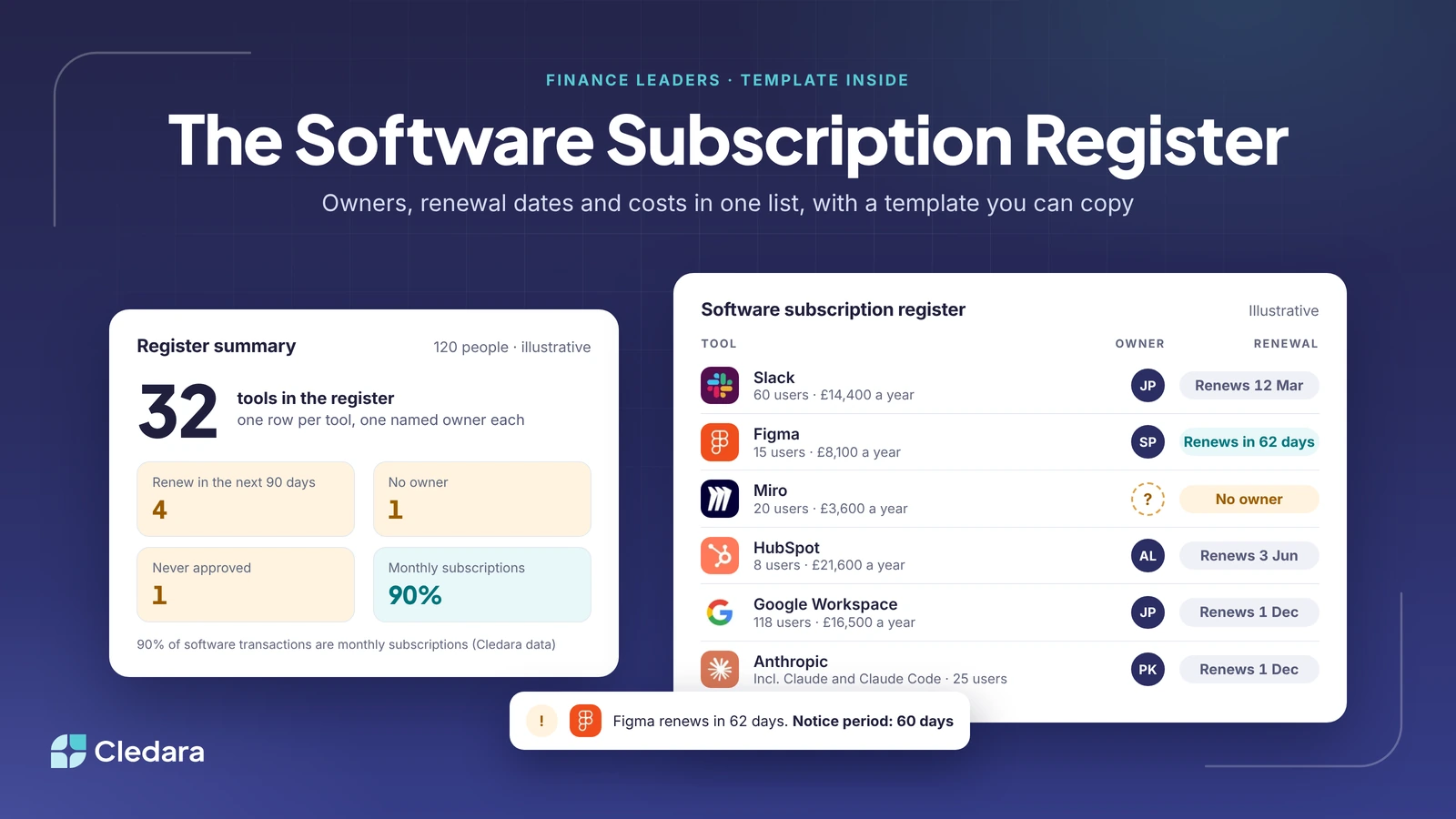
In the example register below, a 120-person company has 32 tools, 4 of them renewing in the next 90 days, and 1 with no owner. Figma renews in 62 days with a 60-day notice period, so that's this week's job. Miro has no owner, was expensed on a personal card and was last used 6 weeks ago. That's probably a cancellation.
Software subscription register template (copy this table)
Here's the software subscription register template as a table you can copy straight into Google Sheets or Excel. The rows are illustrative: real tools, made-up company, made-up figures. Replace them with your own and keep the columns.
Note: keep a second tab for the monthly changes (added, removed, price changed, owner changed). That's the tab your auditor and your board will actually want to read.
What's the best way to track all my company's SaaS renewal dates in one place?
The best way to track all your SaaS renewal dates in one place is a register sorted by renewal date, updated on the same day every month from the payments. Sorted, the top of the list is always your next 90 days, and that's where the money is. Companies that start negotiating 90 days before renewal average 49% savings, against 19% for those that start 30 to 90 days out (2026 renewal benchmarks).
The monthly routine takes about an hour if you do it from last month's payments. Here's the checklist I'd use.
- ✓ Add every new vendor that appeared in last month's payments. Anything new and unapproved gets an owner and a decision.
- ✓ Open every renewal in the next 90 days and decide: renew, renegotiate or cancel. Start the negotiation now, not at 30 days.
- ✓ Chase the "No owner" rows. Nothing should stay unowned for more than one cycle.
- ✓ Check leavers from the HR system against the owner and users columns, and take their seats back (here's how to automate software offboarding).
- ✓ Compare last month's charge for each tool to the register. Anything that went up is a price rise you didn't agree to.
- ✓ Refresh users and last used for the top 10 tools by cost.
Important: put the routine in the calendar with a named owner, the same way you'd treat a VAT return. The register fails when it's everyone's job.
Which platforms show who is responsible for each software renewal?
Software subscription management platforms show who is responsible for each software renewal. They're built around the same register, with one difference: the list builds and updates itself from the payments, so the owner, cost and renewal date for each tool are always current. Cledara is one example, and the one I can speak to honestly, because we built it for exactly this job.
The spreadsheet stops being enough at a predictable moment: when the register has more rows than one person can keep current, when usage matters as much as cost, and when the admin that follows from it (chasing owners, collecting invoices, removing leavers) takes more time than the register itself. At that point the list should do the work, and you should just approve. In practice:
- The register builds itself from every payment, with owner, users, cost, renewal date and a virtual card per subscription. Cancelling a tool is one click: freeze the card and the vendor can't charge it again.
- The "last used" column fills in on its own. Cledara Engage, a browser extension, shows which of 8,000+ tools people actually use, and collects only a username and a timestamp. (More on finding unused and duplicate subscriptions.)
- Renewal alerts arrive before the notice period, not after. The Spend Optimisation module benchmarks each price against similar companies and flags duplicates, unused seats and price increases, and the Negotiation and Renewal Copilot drafts the negotiation.
- The owner column connects to the HR system (BambooHR, HiBob, Personio, Workday, Gusto), so when someone leaves, Cledara Agent removes them from every tool they had and takes back unused seats, once you approve.
- Invoices are collected automatically and synced to Xero, QuickBooks, NetSuite or Tripletex, so the register and the books agree at month-end.
So, which software tracks who owns each business subscription? Any software subscription management platform that starts from the payments. Cledara does it for more than 1,000 companies in 32 countries, and customers save 23% on software spend on average, mostly from the rows a spreadsheet never had: duplicates, unused seats and renewals nobody negotiated. To compare approaches, the guide to SaaS renewal tracking software goes deeper, and the free benchmarks at data.cledara.com will tell you what similar companies pay for the tools in your register.
Why the software subscription register will seem obvious in a few years
I think the hand-kept software subscription register will go the way of the typed-up bank statement. Not that long ago, plenty of finance teams keyed bank transactions into the accounts by hand. Then bank feeds arrived, and within a few years typing them in seemed slightly mad. The register is at the same point. Soon the list will build itself from the payments and the logins, and finance will spend its time on the decisions: renew, renegotiate, cancel, consolidate.
That's the optimistic version, and I think it's the right one. The companies that win will be the ones where the admin runs itself and the people do the thinking, and where the finance team doesn't have to grow in a straight line with the number of tools.
Until then, copy the template, pull 12 months of payments and build v1 this afternoon. If you'd rather the list kept itself, book a demo and we'll show you what your register looks like when it's built from the payments.
Cheers,
Brad