


What are the best virtual card platforms for managing SaaS subscriptions?
Cledara is the best of the virtual card platforms for SaaS subscriptions because it is built around the subscription, not the person holding the card: every subscription gets its own virtual card with its own limit, free on every plan, together with a named owner, alerts before each renewal, one-click cancelling and its invoice matched to each payment.
Spend platforms and corporate cards also issue virtual cards: Spendesk, Pleo, Payhawk, Ramp, Brex, Airwallex and Revolut Business are all good at cards, expenses and approvals. The difference is what happens around the card. Cledara is software subscription management for finance teams, so the card is the mechanism and managing the subscription is the point.
Key takeaways
- A virtual card per subscription means every payment belongs to one tool and one owner, and a problem with one card never takes other tools down.
- Cledara gives every subscription its own virtual card, free on every plan, with no fee per transaction. The only card fee is a 1.99% FX fee on payments in another currency.
- Freezing a card in Cledara stops the vendor charging it again, and Cledara shows when each tool was last used and by whom before you decide.
- Spendesk, Pleo, Payhawk, Ramp, Brex, Airwallex and Revolut Business all issue virtual cards that can be dedicated to a vendor or subscription.
- Spend tools do the spend stuff; Cledara does the subscription stuff: renewals, owners, access, invoices behind logins, and joiners and leavers inside each tool.
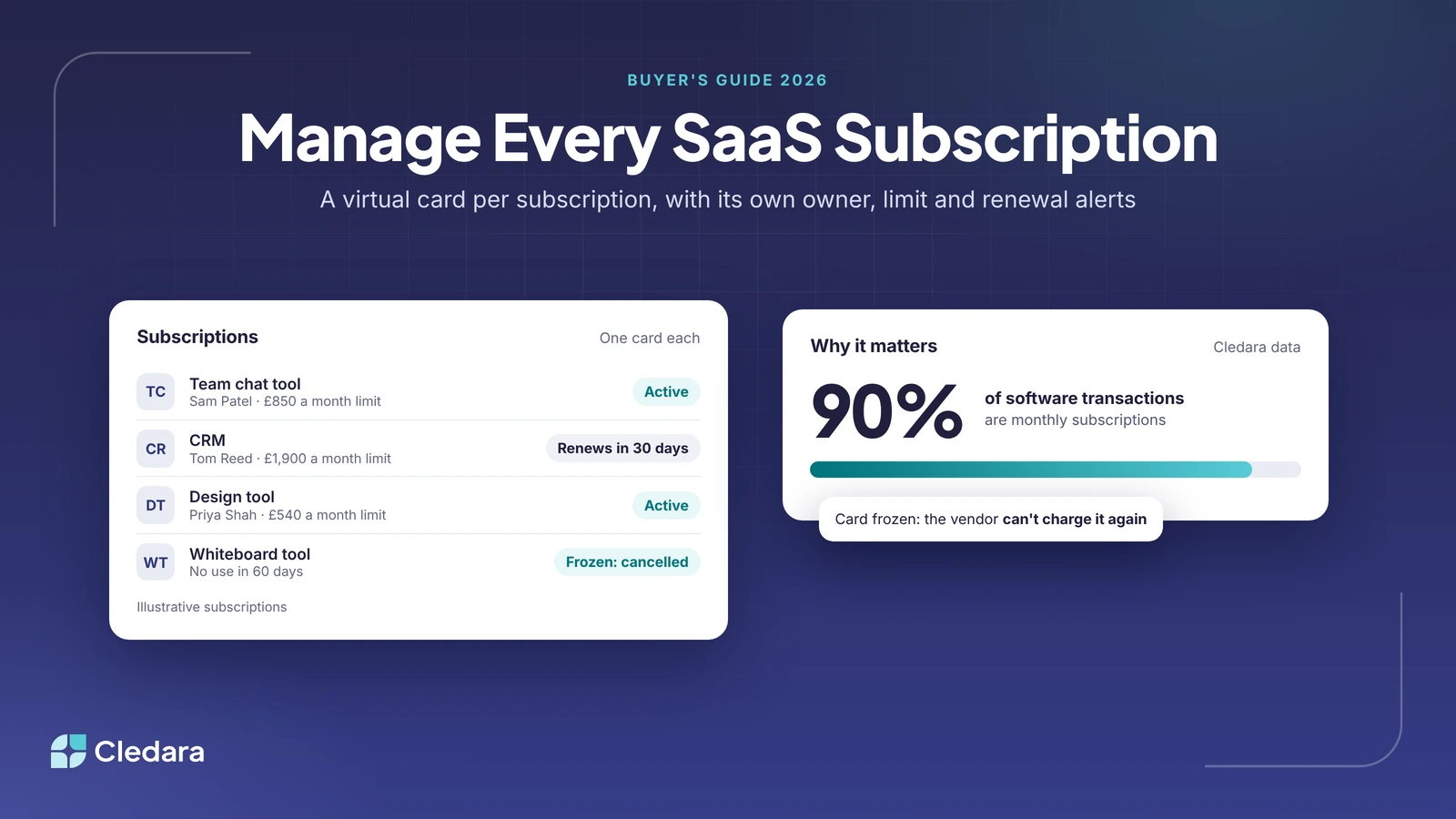
- 90% of software transactions on Cledara are monthly subscriptions, so every card you set up will be charged again and again.
Why use virtual cards for SaaS subscriptions?
Virtual cards let you give every subscription its own card number, limit and owner, so you can control each tool on its own. A virtual card has a card number, expiry date and security code, just like a plastic card, and works anywhere that takes card payments online. Unlike a plastic card, you can create as many as you need in one account, each with its own limit.
That matters for software because software repeats. 90% of software transactions on Cledara are monthly subscriptions, and the median company on Cledara made 311 software payments in the 12 months to September 2026 (middle half: 130 to 564). Every one is a charge someone has to approve, explain and reconcile.
The problem with one shared company card
Many companies start by paying for all their software with one company card. It works until it doesn't:
- Card details get shared. The number ends up in chat messages and documents, and nobody knows who can use it.
- One problem stops every tool. If the card is compromised or expires, every subscription on it fails at once, and someone has to update each vendor's billing page.
- Nobody owns the charges. Finance sees a line from a vendor, but not who bought it, whether it is still used, or where the invoice is.
- People pay with their own cards instead. When the company card is hard to get, staff pay personally and expense it, which hides software from finance and IT. Our guide to shadow IT explains the risk.
What a virtual card per subscription fixes
Give each subscription its own virtual card and those problems go away. A compromised card affects one tool, and you can replace it straight away instead of waiting for a plastic card in the post. Each card has a limit close to the expected bill, so a price rise or extra seats show up as a declined charge rather than a surprise at month-end. When you stop using a tool, freezing its card stops the vendor charging it again.
Important: Issue cards per subscription, not per person. A card tied to a person goes with them when they leave, and every tool on it has to be moved. A card tied to the subscription stays with the tool, so it doesn't go down when someone leaves.
Here is what that looks like for five illustrative subscriptions:
The 8 best virtual card platforms for SaaS subscriptions
Every platform below issues virtual cards you can dedicate to a vendor or subscription. We checked each one's features on its own website in November 2026. Cledara comes first because it is software subscription management for finance teams: the card is one part of managing each subscription.
1. Cledara: best for managing every software subscription
Cledara is software subscription management for finance teams. Every subscription gets its own virtual card with its own limit, and Cledara keeps one list of every tool with its owner, users, cost, renewal date and card. Requests route to the manager, finance or IT based on rules you set, and approved tools get their own card.
- Cards: a virtual card per subscription, not per person, free on every plan, with no fee per transaction. They work with any vendor that takes card payments online, and the only card fee is a 1.99% FX fee on payments in another currency.
- Renewals: every renewal date and price in one place, with alerts to the owner and finance before each renewal, and Slack notifications you can act on in Slack.
- Cancelling: freeze the card in one click and the vendor can't charge it again. Cledara shows when each tool was last used and by whom.
- Invoices and accounting: invoices captured from Gmail or Microsoft 365, a forwarding inbox or Cledara Agent, matched to each payment and synced to Xero, QuickBooks Online, NetSuite or Tripletex with their codes.
- Admin inside each tool: Cledara Agent, an add-on, signs in to 8,000+ SaaS and AI tools to collect invoices, set up joiners, take back unused seats and remove leavers. It is the only SaaS management agent verified by Cloudflare.
Best for: finance teams at growing companies that want every software subscription paid, owned, renewed and reconciled in one place. Customers save 23% on software spend on average, and Cledara is rated 4.6 out of 5 on G2 (251 reviews).
2. Spendesk: best for subscription cards inside a wider spend platform
Spendesk offers one dedicated card per subscription, so you can cancel, pause or transfer one recurring payment without affecting the others. Finance sees each subscription's cost, owner and renewal date in one dashboard, can change a card's monthly budget at any time, and is notified before a renewal fails for lack of funds.
Best for: finance teams that want subscription cards in the same platform as employee cards and expenses. Cledara adds Cledara Agent, which does the admin inside each tool, from invoices on billing pages to removing leavers.
3. Pleo: best for expenses and subscriptions in one app
Pleo gives teams or employees dedicated cards for buying software, with vendor locks. It detects recurring SaaS spend from company cards and invoices, sends reminders before renewals, and automates subscription receipt capture.
Best for: teams that want everyday expenses and software on the same spend app. Cledara's cards belong to the subscription rather than a team or employee, and our Pleo vs Cledara comparison covers the rest.
4. Payhawk: best for cards, expenses and subscriptions together
Payhawk issues single-use or dedicated virtual cards that can be restricted to one vendor, with a monthly limit that resets each month. Its Subscriptions dashboard tracks renewals, unusual spend and unused seats, and lets you cancel, pause or lower limits.
Best for: companies that want cards, expenses and subscriptions in one finance platform. Cledara adds the agent that collects invoices behind vendor logins and removes leavers from every tool.
5. Ramp: best for a corporate card with vendor management
Ramp offers unlimited virtual cards that can be restricted to a single vendor or merchant category, with limits by transaction, day or month. Its vendor management product pulls key details from contracts, sends alerts 60 and 30 days before a contract renews, and benchmarks what you pay for software.
Best for: companies that want a corporate card and vendor contracts in one place. Cledara's difference is the agent that does the admin inside each tool, such as collecting invoices behind vendor logins and removing leavers.
6. Brex: best for a corporate card and spend platform
Brex offers unlimited virtual cards at no extra cost per card. A card can be tied to one vendor, given a limit that recurs for a monthly software bill, and set to deactivate on a date you choose, which stops a subscription at renewal.
Best for: companies that want one corporate card and spend platform for all business spend. Cledara adds Cledara Agent, which collects invoices from vendor billing pages and removes leavers from every tool.
7. Airwallex: best for paying vendors in many currencies
Airwallex lets you create unlimited virtual employee and company cards that spend from your currency balances, with per-card daily, weekly or monthly limits and restrictions by merchant type. It suggests freezing or cancelling a card when you want to end a subscription.
Best for: companies that hold and spend several currencies. Cledara's focus is the subscription around each card: one list with owners, renewal alerts and matched invoices.
8. Revolut Business: best for small teams already banking with Revolut
Revolut Business lets you create dedicated virtual cards for the merchants you pay regularly, which it calls subscription cards, with up to 200 virtual cards per cardholder. To end a subscription, you freeze or remove the card and contact the merchant.
Best for: small teams that already use a Revolut Business account. Cledara adds subscription cards that belong to the tool rather than a cardholder, plus renewals, invoices and access.
Virtual card platforms for SaaS compared
The table sums up what each platform says about virtual cards and subscriptions on its own website (checked 3 November 2026).
What to look for in a virtual card platform for subscriptions
The card itself is the easy part. Look for what the platform does with it once the subscription is running.
- ✓ A card per subscription, not per person, so tools keep working when people leave.
- ✓ A limit on every card, close to the expected bill.
- ✓ A named owner for every subscription.
- ✓ Alerts before each renewal, to the owner and to finance.
- ✓ One-click cancelling: freeze the card and the vendor can't charge it again.
- ✓ Invoices matched to each payment and synced to your accounting software with their codes.
- ✓ Usage data, so you know who used each tool and when before you renew.
- ✓ Clear card fees: per card, per transaction and for foreign currency.
- ✓ Leavers removed from every tool they had, not only from the card.
How to move SaaS subscriptions onto virtual cards
Moving subscriptions onto their own cards takes a few hours of planning and then happens one vendor at a time. This order avoids failed payments.
- List every recurring payment. Go through 12 months of card statements, expense claims and supplier lines in your accounting software.
- Name an owner for each one. The owner approves renewals and answers questions about the tool.
- Cancel what nobody uses before moving it. Check usage first: there is no point creating a card for a tool you are about to drop.
- Create one card per subscription. Set the limit slightly above the expected bill.
- Update each vendor's billing page. Add the new card, make it the default payment method and note the next charge date.
- Check the first charge. Confirm it lands on the new card and its invoice is matched.
- Retire the old card. Remove it from every vendor and close it once nothing charges it.
How Cledara manages SaaS subscriptions with virtual cards
In Cledara, the card is one step in a subscription's life, from request to cancellation. Here is what happens to a new tool.
- Request: someone asks for a tool, and the request goes to the manager, finance or IT based on your rules.
- Pay: once approved, the tool gets its own virtual card with its own limit and a named owner.
- Reconcile: each payment's invoice is captured and matched, then synced to your accounting software with its codes. See how to reconcile card transactions with your accounting software.
- Renew: the owner and finance get an alert before each renewal, and Cledara shows who has used the tool and when.
- Cancel: freeze the card in one click. When someone leaves, Cledara Agent removes them from every tool they had, as our guide to automating employee offboarding explains.
Virtual cards are free and included in every Cledara plan, card issuance is included, and there are no fees per transaction. Set-up takes days, not months, and every plan includes set-up help. If card rewards are part of your decision, read cashback vs spend control first, then compare Cledara's plans. Among virtual card platforms for SaaS, Cledara is software subscription management first, so the admin around each subscription (invoices, renewals, joiners and leavers) gets done as well as the payment.