


What is SaaS spend management that integrates with QuickBooks?
SaaS spend management that integrates with QuickBooks is software that keeps one list of every software subscription your company pays for and sends each payment, with its invoice and codes, into QuickBooks without anyone typing it in (Cledara is one example). A SaaS spend management QuickBooks integration is the part that does the sending. The category gets called SaaS spend management; at Cledara we call it software subscription management, because the subscription is the thing you manage, not the transaction.
Here's a funny thing about accounting software. QuickBooks is very good at being the books. It's not very good at knowing what your company bought, who bought it, and whether anyone still uses it. That part has always been done by people, usually a bookkeeper with a bank feed and a lot of patience.
Software made that job bigger. Cledara's data says the median company pays for 32 software tools, and 90% of software transactions are monthly subscriptions. That's roughly 30 card charges a month that each need an account, a class and an invoice before the books close. Fair enough if it's five tools. At 32 it's a job.
Key takeaways
- A SaaS spend management QuickBooks integration should sync four things: the card transaction, the invoice, the account and class codes, and the reconciliation status.
- QuickBooks Online takes a live sync. QuickBooks Desktop takes an export: transactions and invoices as CSV, or a statement for any period.
- Cledara customers save 23% on software spend on average, and a typical customer gets 30+ hours a month back.
- In a demo, ask to see a month-end with the integration on, not a dashboard. Count the unmatched lines.
What does a SaaS spend management QuickBooks integration actually sync?
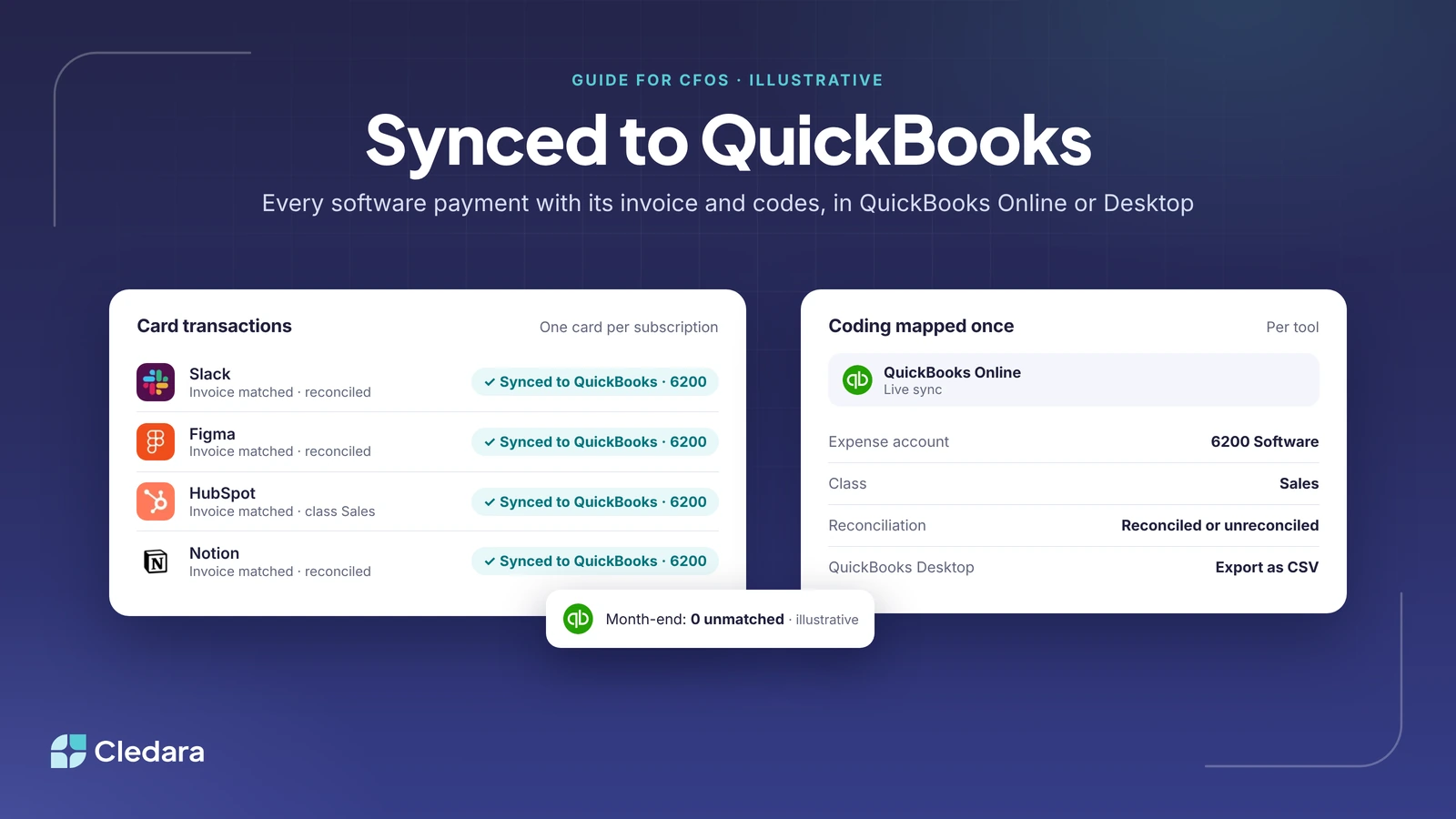
A good SaaS spend management QuickBooks integration syncs the card payment, the matching invoice, the expense account and the class or department, and whether the line is reconciled. Anything less and someone is still finishing the job by hand in QuickBooks. Here's how each one lands in Online and in Desktop.
Two details matter. One card per subscription means one transaction per subscription, so the line in QuickBooks says "Figma", not "CARD PAYMENT 4821". And coding is mapped once per tool: tell Cledara that HubSpot goes to account 6200 Software, class Sales, and every HubSpot payment arrives coded the same way.
Tip: If you're still working out how a SaaS subscription should hit the books (prepayment, amortisation, accrual), read how to account for SaaS subscriptions first. The integration sends the payment; the policy is still yours.
QuickBooks Online vs QuickBooks Desktop: what changes for SaaS spend management
QuickBooks Online has a live integration with Cledara, included on every plan. QuickBooks Desktop doesn't have a live connection; it takes transactions and invoices by export and import. The difference is whether a sync does the last step or a person does.
In QuickBooks Online
Connect Cledara to QuickBooks Online once, map each tool to its account and class, and each software payment syncs with its invoice and codes, reconciled or unreconciled as you choose. That's the whole set-up (see pricing for what each plan includes).
In QuickBooks Desktop
I'll be straight about this, because a lot of vendors aren't. Cledara's integration is with QuickBooks Online. For QuickBooks Desktop, you export transactions and invoices from Cledara as a CSV, or download a statement for any period, and import them. Invoices are still matched to payments automatically in Cledara, and the register, approvals, renewals and cards work the same way. What you don't get is the overnight sync into the ledger.
Note: Check which import format your version of QuickBooks Desktop accepts before you plan the export routine, and check the export columns against it. Your accountant will know which one your file needs.
Worth knowing: Intuit stopped selling new subscriptions to QuickBooks Desktop Pro Plus, Premier Plus, Mac Plus and Enhanced Payroll to new US customers after 30 September 2024. Existing subscribers can keep renewing, and Enterprise is unaffected (Intuit's announcement). If a move to Online is on your roadmap, set up the SaaS spend management QuickBooks integration after it, so you do it once.
What are the best SaaS spend management platforms that integrate with QuickBooks for a CFO?
The best SaaS spend management platform that integrates with QuickBooks for a CFO is the one that controls spend before it happens and books it without a person in the loop afterwards: a card per subscription with its own limit, approvals before a tool is bought, invoices collected automatically, and a sync that carries the codes. Cledara is built around that list, so I'll use it as the example. I'd judge any SaaS spend management QuickBooks integration on five things:
- Control at the moment of purchase. Every subscription gets its own virtual card with its own limit (cards are free on every plan). A charge can't go through above the limit, and freezing the card cancels the tool in one click.
- Approvals that route themselves. Requests go to the manager, finance or IT based on rules you set, with Slack actions.
- Invoices that arrive on their own. Email capture and a forwarding inbox, and for the ones nobody emails you, Cledara Agent signs in to the vendor's billing page and gets them overnight.
- Coding mapped once. Expense account, department and cost centre set per tool, applied to every payment.
- Benchmarks and a renewal diary. One list of every tool with owner, users, cost and renewal date, plus benchmarks against similar companies that flag duplicates, unused seats and price increases (free at data.cledara.com).
The outcome across Cledara's customers is 23% saved on software spend on average, and 30+ hours a month back for a typical customer. Jiminny's finance team found an extra 15% of subscriptions it didn't know it was paying for once everything ran through one list (their story). And QuickBooks is the second most used accounting tool across Cledara's customers, after Xero, so this integration gets a lot of use.
How to sync corporate card transactions to accounting software
To sync corporate card transactions to QuickBooks you need a card that creates one line per subscription, an invoice attached to that line, codes set in advance, and a connection that pushes all three into QuickBooks Online (or an export for Desktop). In order:
- Put every subscription on its own card, with a limit at the agreed price. The transaction then names the tool, and a price rise can't sneak through.
- Add the owner and renewal date. About two minutes per subscription. Now the list of cards is also your software register.
- Map each tool to its codes once, as part of approving it, so no payment ever arrives uncoded.
- Switch on invoice capture. Email capture, the forwarding inbox, and Cledara Agent for vendors that only post invoices behind a login.
- Connect QuickBooks Online and choose reconciled or unreconciled. Unreconciled if your controller wants to review before posting.
- On Desktop, set an export routine. Export the month's transactions and invoices as CSV, or a statement, and import on the same day each month.
- Check the exceptions, not the lines. Month-end becomes a short list of payments with no invoice yet. The target is 0 unmatched.
For the detail on matching card lines, see how to reconcile card transactions with your accounting software.
What are the best accounting automation options that integrate with QuickBooks for SaaS?
For a SaaS company on QuickBooks, the accounting automation worth having removes a job rather than speeding it up: invoices collected without chasing, payments coded by rule, leavers' seats taken back, and renewals that wait for a decision. The options, from the one every finance team already has to the one that does the admin for you:
- The QuickBooks bank feed. Free, already there, and it gives you a line with no invoice, no owner and no code.
- Receipt capture apps. Good for expenses. Software invoices mostly sit behind a vendor login, so someone still has to download the PDF.
- A SaaS spend management QuickBooks integration. Each software payment arrives with its invoice and codes attached. This is where the month-end hunt stops.
- Cledara Agent on top. It collects the invoices nobody emails you, sets up new joiners, takes back unused seats and removes leavers, after you approve, in 8,000+ SaaS and AI tools. It's the only SaaS management agent verified by Cloudflare.
For the tools finance teams run alongside QuickBooks, see the top SaaS accounting tools, and for everything Cledara connects to, Cledara works with every accounting platform and ERP.
SaaS spend management with QuickBooks for the CFO, the controller and the bookkeeper
The same SaaS spend management QuickBooks integration does a different job for each person in finance.
For the CFO
You want a software line in the P&L you'd defend to the board. A SaaS spend management QuickBooks integration gives you the register and the ledger from the same source, so the two always agree. Renewals become decisions rather than charges (prices rise 8 to 12% a year on average, according to Cledara's renewal benchmarks). And a 23% average saving funds the next hire.
For the controller
You want the close to stop depending on other people. Every software payment names its tool, carries its invoice and lands in QuickBooks Online with the account and class you set. Add Cledara Agent and month-end starts with the invoices already in place, collected overnight, so the exceptions list is short enough to clear before lunch.
For the bookkeeper
You want fewer lines to touch. Coding is set once per tool, so the 30-odd monthly subscription payments arrive coded and matched. What's left is the interesting part: the odd new vendor, the payment with no invoice yet, the duplicate tool someone should cancel (see finding unused and duplicate subscriptions).
The demo checklist: what a CFO should check in a SaaS spend management QuickBooks integration
Ask the vendor to run a month-end in front of you with the SaaS spend management QuickBooks integration switched on. A dashboard proves nothing; a close does.
- ✓ Does each software payment arrive as its own line, named after the tool rather than the card?
- ✓ Is the invoice attached to the payment, and where did it come from?
- ✓ Are the expense account and class set per tool, once, and can I choose reconciled or unreconciled?
- ✓ What happens to a payment with no invoice yet? Show me the exceptions list.
- ✓ For QuickBooks Desktop: show me the CSV export and the statement, and the columns they carry.
- ✓ Can a charge go through above the agreed price? (With a card per subscription and a limit, it shouldn't.)
- ✓ When someone leaves, who removes them from the tools and takes back the seat?
- ✓ Does the register show owner, users, cost and renewal date for every tool, with a price benchmark against similar companies?
Important: Ask about QuickBooks Desktop directly and expect a direct answer. If a vendor says "yes, we integrate" and means "we have an export", you want to know before you buy, not at your first close. Ours is in writing above.
Where this is going
Not that long ago, plenty of finance teams typed bank statements into the accounts by hand. Then bank feeds arrived and nobody went back. Software payments are at the same point. The feed told you money left; the next step is the payment arriving with its invoice, its codes and its owner, and the admin around it done by software rather than by someone in finance who has better things to do.
If you're on QuickBooks (Online or Desktop) and you'd like to see a month-end run with the integration switched on, book a demo. Bring your exceptions list. Ours is short!
Cheers,
Brad