


Why set AI spending limits by team at all?
Here's a funny thing about AI spend. Almost every AI tool lets you set a limit somewhere. Very few companies set one anywhere. So the first anyone in finance hears about a big month on OpenAI or Anthropic is the invoice, which turns up a few weeks after the money went. If you want to set AI spending limits by team and employee, the hard part isn't finding a limit to set. It's choosing where the limit lives, because each place stops a different thing.
This post goes through the four places an AI spending limit can live, what each one actually stops, and a worked example for a 120-person company. I've checked what OpenAI, Anthropic and Cursor let admins do as of November 2026 and linked the pages.
Key takeaways
- 27% of software spend on Cledara now goes to AI-native tools, up from about 3% two years ago.
- OpenAI, Anthropic and Cursor all let an admin set spending limits, but each covers only what that provider bills, in a console finance doesn't log in to.
- Seat plans cap headcount, not usage.
- A virtual card per AI subscription with its own monthly limit is the one control that works the same for every provider.
- A budget by team, with an alert before spend runs over, turns a surprise invoice into a decision made in time.
- Put the limit where the money leaves, and the alert where the owner will see it.
The scale is why it matters now. Across more than 1,000 companies on Cledara, 27% of software spend goes to AI-native tools, up from about 3% two years ago. On 16 November 2026 the three vendors at the top of the daily market activity feed on data.cledara.com were Anthropic, OpenAI and Cursor. And 90% of software transactions are monthly, so the bill moves every month with what people did.
The other reason is who's using it. Cledara's October 2026 data puts AI adoption at 55% for Data and AI teams, 38% for Marketing and 23% for Engineering. Finance sits at 16%, tenth of twelve teams. The team that owns the budget is being asked to control something it doesn't see much of. Limits are how you fix that without becoming the AI police.
Where an AI spending limit can live
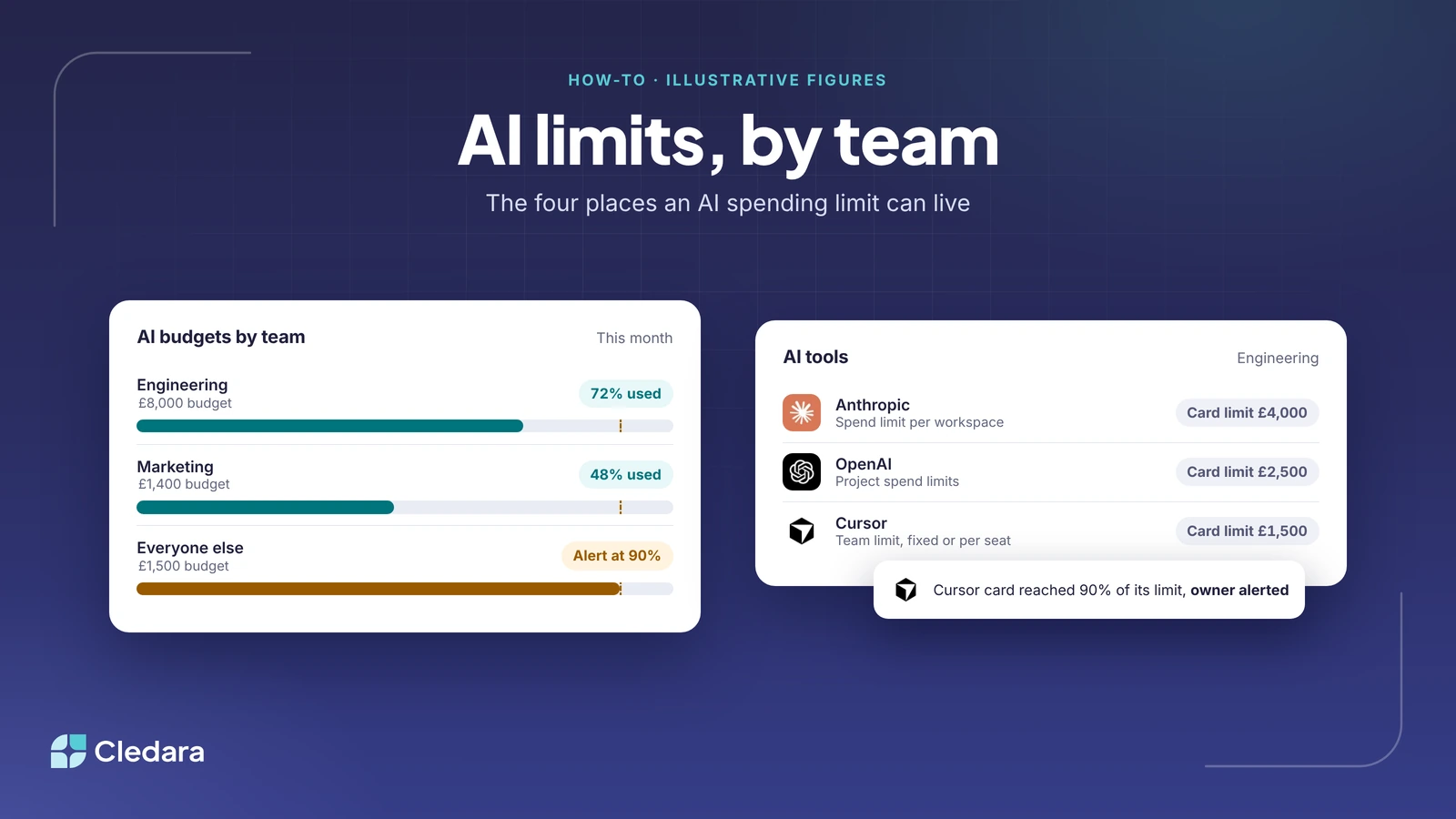
There are four places an AI spending limit can live, and each one caps a different thing. A provider limit caps what one provider bills. A seat plan caps the number of seats. A card limit caps what the vendor can take, whoever they are. A budget caps nothing on its own, unless it's a hard cap, but it's the only one that tells a person before the limit is hit.
Most companies I talk to have one of these, usually the first. The ones who sleep well have all four.
Which company-wide AI tools let admins set AI spending limits by employee or team?
The three providers engineering teams pay most often all let an admin set AI spending limits by team or by person, in different shapes. OpenAI does it by organisation and project. Anthropic does it by workspace. Cursor does it by team, with per-member overrides on Enterprise. Here's what each page says as of November 2026.
OpenAI: organisation and project spend limits
OpenAI's spend limits guide describes two levels. An organisation hard limit applies to API traffic across all projects in the organisation, and a project hard limit applies only to traffic billed to that project. There are two controls: spend alerts, which send a notification while traffic continues ("Spend alerts do not enforce a cap"), and hard spend limits, which block traffic with a 429 error until you raise the limit or the next monthly cycle starts. Enforcement isn't instant, so recorded spend can slightly exceed the figure.
Anthropic: a monthly spend limit per workspace
Anthropic's Console organises API use into workspaces, and the workspaces page says you can cap monthly spending for each one from the Spend limits page in the Console. If Anthropic bills you directly you can also add email alerts for when spending reaches an amount you choose. Two things to know: you can't set a spend limit on the Default Workspace, and organisation-wide limits always apply even if the workspace limits add up to more. The Claude Code workspace is the only one that supports per-user monthly spend limits.
Cursor: a team limit, with per-member overrides on Enterprise
Cursor's spend limits page explains that limits cap paid additional usage in a billing period. Team admins set one limit for the whole team, either fixed or per seat, and Enterprise plans add member-level and group overrides on top. When a limit is reached, additional usage stops for that user until the limit is increased or the next period starts, and other team members aren't affected. Spend alerts are separate, go by email to the admins or the member, and, in Cursor's words, "don't stop usage".
What all three miss is the same thing. Each limit covers what that one provider bills under that one account. It doesn't cover the image tool marketing bought last month or the second OpenAI account a contractor set up. And it lives in a console finance doesn't log in to. A limit nobody in finance can see is still a surprise invoice, just with a delay on it.
Seat plans cap headcount, not usage
A seat plan is the easiest AI spending limit to understand: 40 seats at a fixed price is a hard cap by headcount. The catch is that seats are not usage. Most AI tools bill usage on top of the seat once someone passes what's included, and a fixed seat fee does nothing about that. Cursor's own docs describe exactly this split: included usage on the plan, then additional usage that needs its own limit.
Seat plans also fail the other way. The seat nobody uses still bills, and so does the seat of someone who left in March. That's why orphaned AI subscriptions got a post of their own. Seats are a fine place to start and a poor place to stop.
The card that pays: the one AI spending limit that works for every provider
The only AI spending limit that works the same way for every provider is the one on the card that pays them. With Cledara, every subscription gets its own virtual card with its own monthly limit, so the vendor can't take more than you've agreed, whatever their console says. It works with any vendor that takes Visa (in the UK and Europe) or Mastercard (in the United States) online, with no integration needed, so it covers the video tool marketing found on Tuesday just as well as it covers OpenAI.
That's the point of putting the limit where the money leaves. Provider limits need an admin in each console. A card limit needs one person in finance, once, when the subscription is approved. If a tool goes rogue, you freeze the card and it can't charge you again. If someone leaves, the tool keeps working, because the card belongs to the subscription and not the person.
Tip: one card per subscription, not one card per team. A shared engineering card tells you nothing when it's hit. Three cards for Anthropic, OpenAI and Cursor tell you exactly which one did it.
Which products enforce AI budgets and alert owners before overspend?
A limit stops the money. A budget with an alert reaches the owner before the limit does, which is what you actually want: a decision made in time rather than an engineer locked out mid-sprint. Cledara connects to AI providers such as OpenAI, Anthropic and Cursor and tracks usage every day against the budget you set. It warns finance and the subscription owner before spend runs over, and each AI budget can be a hard cap or a soft cap: a soft cap warns before spend runs over, and a hard cap stops spend at the limit.
The providers alert too, as above. The difference is who gets told. Those alerts go to the admin inside each console. A budget alert by team goes to the subscription owner and to finance, from one place, across every provider, with a Slack notification where people already are. We wrote up the mechanics in how to track OpenAI and Anthropic spend, and the by-team view in AI spend management by team and company size.
How to set AI spending limits by team and employee: a worked example
Take a 120-person company in the UK. Engineering is 40 people on Anthropic, OpenAI and Cursor. Marketing is 12 people on OpenAI plus image and video tools. Everyone else, 68 people, gets one general AI assistant on a seat plan. All the figures below are illustrative, to show the shape rather than the right number for you.
Engineering gets all four controls because that's where usage billing bites. Marketing gets the card and the budget because most of its tools have no limit of their own. Everyone else is a seat plan, so the job there is seat hygiene. On the 20th the Cursor card reached 90% of its limit, owner alerted, and the engineering lead lifted it for a release week rather than find out on the invoice. That's the system working.
Step by step
- List every AI tool you pay for, with its owner, cost, renewal date and card. Every other step depends on it. Cledara builds the list from every payment, and the Engage browser extension shows which tools people actually use, including the ones nobody approved.
- Decide the limit per team from the last three months of spend, not a guess. Benchmarks for what similar companies pay are free at data.cledara.com.
- Give every AI subscription its own virtual card with a monthly limit.
- Where the provider offers one, set its own spend limit too: OpenAI by project, Anthropic by workspace, Cursor by team. That stops a runaway API loop within minutes.
- Connect OpenAI, Anthropic and Cursor to Cledara and set a budget per subscription, hard cap or soft cap, so the owner and finance are warned before spend runs over.
- Route new AI tool requests through approval, so the next tool gets its card, owner and limit on day one. Our AI tool approval checklist is the short version.
- Review monthly: unused seats, leavers still on a plan, and limits lifted "just for this month" three months ago. Cledara Agent can take back unused seats and remove leavers once you approve.
AI spending limits checklist
- ✓ Every AI tool is on one list with an owner, a cost and a card
- ✓ Every AI subscription has its own virtual card with a monthly limit
- ✓ Provider spend limits are set for OpenAI projects, Anthropic workspaces and Cursor teams
- ✓ Each team has a budget, and the owner and finance get an alert before spend runs over
- ✓ Seat counts are reviewed monthly against who actually uses the tool
- ✓ New AI tools go through approval before they get a card
- ✓ Leavers are removed from every AI tool they had, not just the ones you remember
Put the limit where the money leaves
Honestly, the companies that handle AI spend well aren't the ones with the strictest limits. They're the ones whose limits sit where the money leaves and whose alerts reach the person who can act. Finance sets the card limit and the budget once. Engineering sets its provider limits because it understands them. Nobody chases anyone, and nobody opens an invoice to learn what happened last month.
Customers who manage their software with Cledara save 23% on software spend on average, and a good chunk of that is limits that were never set before. If you'd like to see AI budgets by team in practice, book a demo. Plans are on the pricing page, and the wider landscape is in our guide to AI spend management tools.
Cheers,
Brad